
The short answer
Image SEO for AI search starts with an indexable, useful page and an image that is genuinely relevant to it. Put the visual in a standard HTML image element, describe it in plain-language alt text, place it beside explanatory copy, use a descriptive filename, and provide a fast, responsive file. Add a representative image to Article structured data and social metadata when appropriate. These steps improve discovery and understanding; they do not guarantee a Google Images ranking or an AI citation.
Key takeaways
- The landing page matters as much as the file: Google uses surrounding text, captions, titles, and page metadata to understand an image.
- Alt text should describe the image for a person who cannot see it; repeating a target keyword is not a substitute for a useful description.
- Use original diagrams, screenshots you own or can license, and examples that add information the paragraph alone cannot provide.
- Google AI Overviews and AI Mode have no separate image optimization requirement; normal Search eligibility and helpful content remain the foundation.
- Measure image discovery, web clicks, and AI answer appearances as separate signals. None alone proves a lead came from an image.
What image SEO means in an AI search journey
A buyer might discover your company through a text result, an image result, a visual search, or an AI answer that links to a page containing a useful graphic. Those are related discovery paths, but they are not one ranking system. Image SEO is the work of making a visual available, understandable, relevant, and fast on a page that serves the searcher's question. For an AI search program, the same visual can also help a human verify an explanation after clicking a cited page.
Start with the searcher's task. A B2B buyer comparing AEO reporting tools may need a diagram showing the difference between a brand mention and a source citation. A screenshot of an actual report may help them verify a workflow. A generic photo of a laptop adds little. The most useful image is usually the one that compresses a difficult explanation into something the reader can check, save, or share. That usefulness gives the image a reason to exist beyond decoration.
Google says its AI features use the same foundational SEO practices as Search. A page must be indexed and eligible for a snippet to be eligible as a supporting link in AI Overviews or AI Mode. Eligibility is not a promise that the page, or a particular image, will appear. Treat image SEO as one part of a helpful page, not a special switch for an AI engine.
Sources: Image SEO best practices, AI features and your website.
Choose a visual from the question before choosing a format
Before commissioning artwork, write the exact question the section answers. Then ask what visual evidence would make the answer clearer. A process needs a flowchart. A comparison may need a labeled matrix. A product instruction may need a current screenshot with the relevant controls visible. A result claim needs a chart whose source, date range, denominator, and method are stated. This planning step also makes the eventual filename, alt text, and caption easier to write because each has a concrete subject.
Match visual intent to page intent. If the page teaches image SEO, a diagram of an image's discovery path belongs near the explanation of crawling. If the page sells a service, a genuine sample deliverable may help buyers evaluate the offer. Do not attach the same generic visual to every post simply to reach an image count. Repeated filler can make pages look different to a crawler while adding almost nothing for a reader.
For a new blog, plan one distinctive thumbnail and add as many in-article visuals as the explanation needs. Record who created each asset, whether it contains third-party material, and where it can be reused. Review rights before republishing third-party visuals; screenshots of your own workflow are often easier to verify and maintain.
Sources: Helpful, reliable, people-first content, Image SEO best practices.
Publish the image on a crawlable, relevant page
An image cannot carry an otherwise inaccessible article into search. Check that the page returns a successful response, is not blocked from crawling, does not carry a noindex directive, and has a sensible canonical URL. The surrounding section should explain the concept in text, with a heading that matches the reader's task. An image-only article forces both visitors and search systems to infer too much from pixels.
Use a standard HTML image element with a real src value. Google's image guidance says it discovers images in the src attribute of an img element, including images inside a picture element, but it does not index CSS background images. If a key diagram exists only as a background or is inserted after a user interaction, you have made discovery less reliable. Next.js Image renders an img element and can provide responsive sizes; verify the rendered HTML when using any image component.
Keep the image near the paragraph it supports. A caption can explain the conclusion the reader should draw, while the body text gives the caveat or method. Make the asset URL stable when you update a guide, and redirect an old image URL if other pages have linked to it. This is especially useful for original reference graphics that may earn links independently of the article.
Check a published image in Chrome
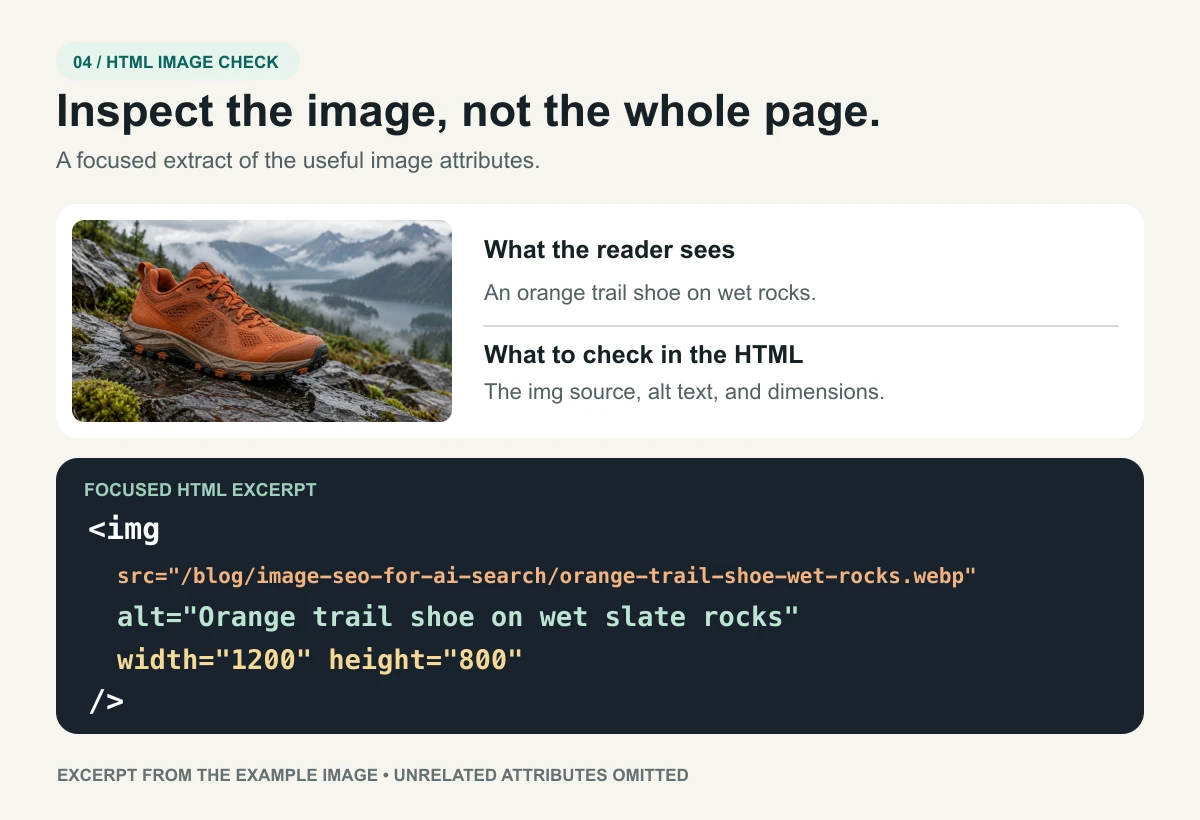
- Open the public article and right-click the meaningful image, then choose Inspect.
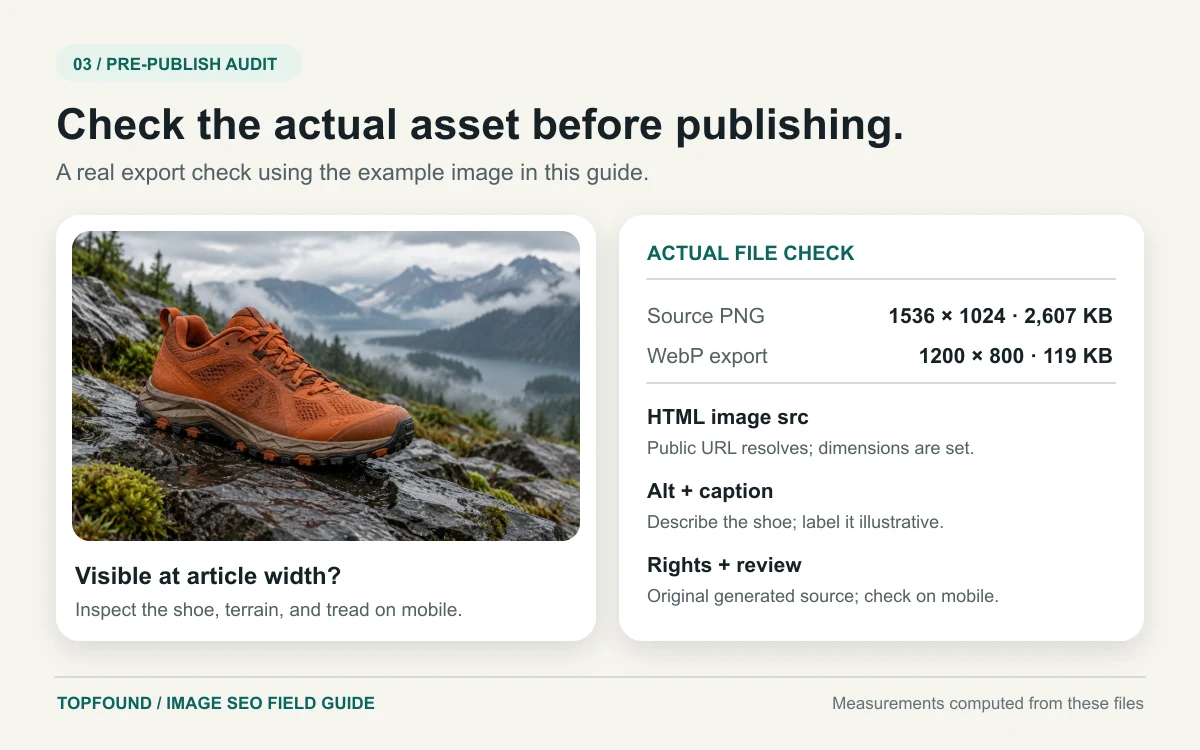
- In Elements, confirm the rendered img has a working src, useful alt text, width and height, and appropriate responsive sizes or srcset.
- Open the image URL directly and verify it loads without a login. Then check that the article is indexable and the image sits beside relevant text.
Sources: Image SEO best practices, AI features and your website.
Write the filename, alt text, and caption for different jobs
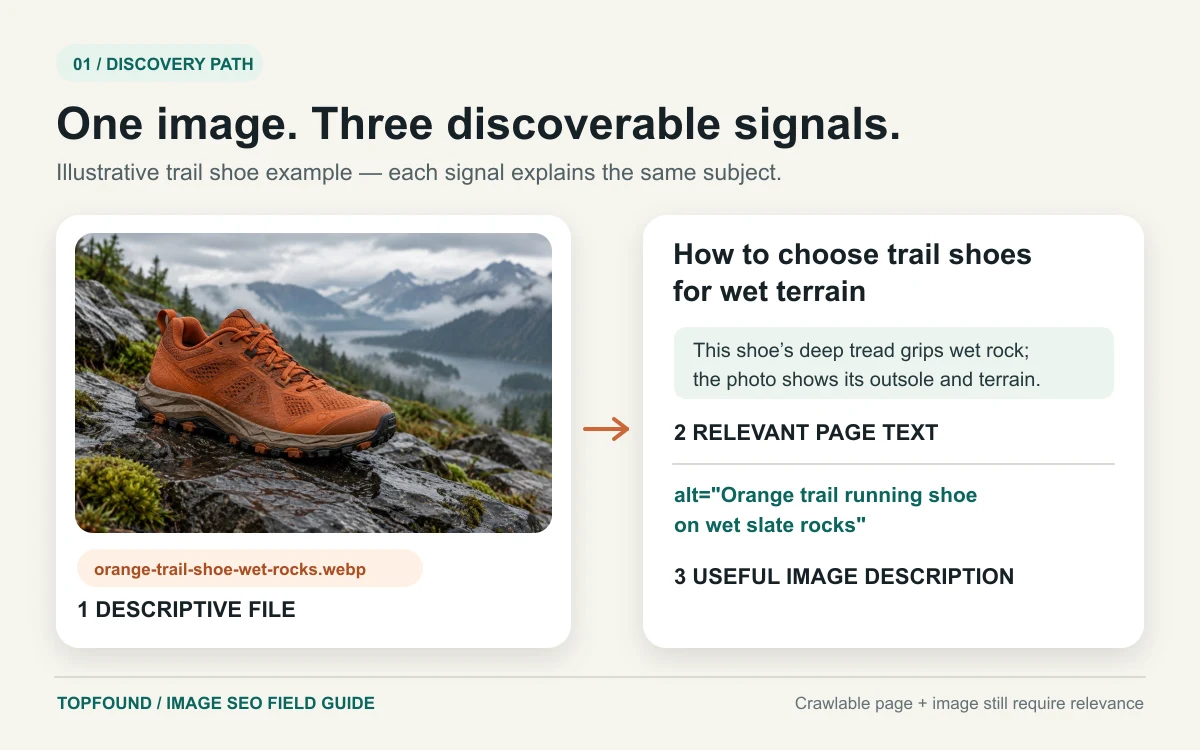
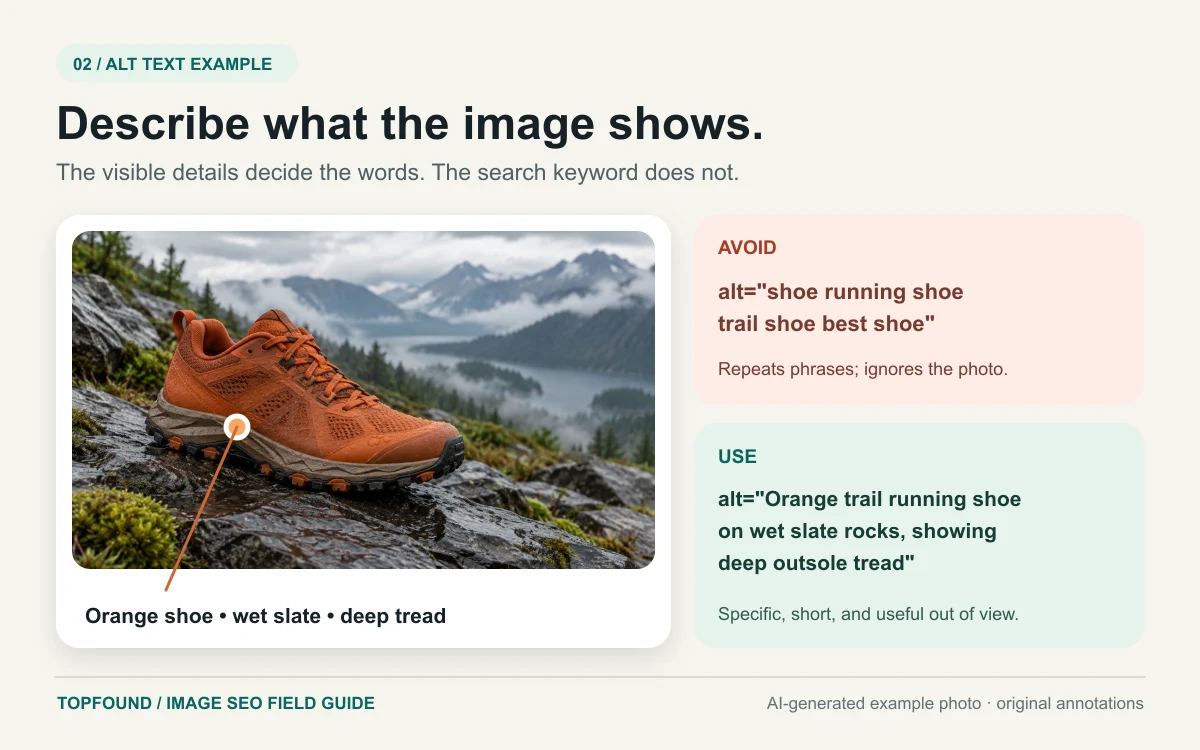
A filename is a compact label for the asset, such as orange-trail-shoe-wet-rocks.webp in the worked example below. It helps a person and a crawler identify the file in a URL. Use words that describe what the file shows; avoid export names like final-v7 or a string of repeated keywords. Google explicitly recommends short, descriptive filenames and says the extension should match the actual format.
Alt text is the image's replacement description. It should tell someone who cannot see the visual what information it contributes in that context. For a diagram, describe the relationships, not every decorative shape. Good alt text might be: 'Flowchart showing an indexable article with a relevant image leading to Google Images discovery and a possible AI answer link.' A poor version would be: 'AI image SEO Google AI search best image SEO image ranking.' If an image is purely decorative, use empty alt text instead of a keyword label.
A caption is visible editorial context. It can state what a screenshot proves, identify an illustrative example, cite a data source, or warn that a diagram is conceptual. The orange shoe example below shows the distinction: its alt text describes visible details, while this caption explains that the source image was generated for teaching. Alt text and captions do not have to repeat each other. The nearby paragraph should answer the reader's question even if the image is unavailable; the image should make that answer easier to grasp. This division of labor keeps accessibility, search context, and editorial honesty aligned.
Sources: Image SEO best practices.
Balance visual quality with page speed
A diagram that becomes unreadable on a phone is not a useful diagram. Export at a resolution that keeps lines and labels legible in the layout where it appears. Prefer a clean crop over a screenshot of an entire dashboard at tiny scale. If the detail is essential, provide a larger view or split the workflow into multiple focused images. For photos and complex illustrations, test WebP or AVIF against a high-quality JPEG; for line art, an optimized SVG or a crisp raster export may be clearer.
Use explicit dimensions or an aspect ratio so the browser reserves space before the file arrives. Supply responsive sizes so a phone does not download the same large asset as a desktop. Lazy load images below the first viewport; prioritize the main visual when it is part of the largest visible content. Compression should remove unnecessary bytes without blurring text or data. A faster page improves the reading experience, although no file format is a guaranteed ranking advantage by itself.
Inspect the delivered result, not just the source file. A polished 1200-pixel export can still render soft if the site stretches it to 1600 pixels, or it can arrive through an oversized transformation. On a real phone, check whether labels are readable, the caption stays close to the graphic, and loading does not shift the article. PageSpeed Insights and browser network tools can expose an unexpectedly heavy hero image before it becomes a template-wide problem.
Match the export to the visual's job
| Visual | Starting format | Review before publishing |
|---|---|---|
| Photo | WebP, AVIF, or quality-tested JPEG | Texture, color, dimensions, and file weight |
| Diagram | SVG or a crisp raster export | Label contrast and mobile legibility |
| Interface screenshot | PNG or a quality-tested WebP | Small text, crop, sensitive details, and capture date |
Sources: Image SEO best practices.
Use representative images in metadata and structured data
The article's main image should reflect the article's subject. Set a relevant Open Graph image so a shared link has a useful preview. For a blog post, BlogPosting or Article structured data can describe the headline, publication and modification dates, author, and image. Google says Article markup can help it understand those facts and show better title, image, and date information in some Search appearances. It does not make an article eligible for an AI citation by itself.
Structured data must match visible content. If the page names an editorial team as its author, do not invent a named expert in JSON-LD. If an image is a conceptual diagram, do not label it as a measured case study. The image URL in schema should resolve to the actual public asset, and its dimensions should match the file. The same applies to the social preview. A compact, accurate graph is better than a large collection of unsupported schema types.
Google's image guidance says it may consider an image property on the article or a primaryImageOfPage property on the webpage when choosing a preview. It also considers page content and metadata, and selection remains automated. Make the preferred image clear, but keep expectations realistic: you are giving systems consistent information, not commanding a particular search result layout.
Sources: Image SEO best practices, Article structured data.
Decide whether an image sitemap is worth adding
An image sitemap is a discovery aid, especially when important image URLs are difficult to find through normal page crawling. Google says it can be used to provide image URLs it might not otherwise discover. It is not a substitute for an indexable landing page or an HTML img element. For a small editorial site whose images are already in server-rendered article HTML, confirm crawlability first before building a separate XML system.
If your site has a large visual library, images on a CDN, or dynamically assembled galleries, image entries in a sitemap may be worthwhile. Include the canonical page URL and the actual image URL, keep both publicly fetchable, and update the sitemap when an asset changes. Search Console can help you spot crawl and indexing problems, but an image URL appearing in a sitemap should never be reported as proof that it ranks in Google Images.
The practical sequence is simple: inspect the live article HTML, fetch one image URL directly, check robots and page indexability, and only then add sitemap support if discovery remains a problem. This prevents a common detour in which a team adds more XML while the real issue is a blocked page, a missing img src, or an image that offers no distinct value.
Sources: Image SEO best practices, Image sitemaps.
Use screenshots as evidence, with rights and context
A screenshot can be the best visual for a product tutorial because it shows where to click and what to expect. Capture the relevant part of the interface, remove personal or customer information, and note the product and date when the interface can change. The accompanying text should explain the action; a screenshot alone may become stale or inaccessible. When a feature moves, update both the image and the instruction rather than changing the date on the article without reviewing it.
Do not copy a competitor's chart or screenshot merely because it is easy to capture in a browser. A publicly visible image is not automatically licensed for republishing. Link to the source when you discuss their research, request permission when you need their visual, or create a clearly original diagram from facts you can substantiate. This also gives your own article a distinctive asset that another writer could cite instead of another duplicate stock graphic.
If you use third-party material under a license, retain the license record, credit the creator as required, and avoid cropping away context that changes the meaning. For a result chart, state the source and measurement method in the caption. The goal is a reader who can understand what the image shows and how much confidence to place in it without guessing from a decorative thumbnail.
Sources: Helpful, reliable, people-first content.
What image optimization can and cannot do for AI answers
AEO and GEO are often used to describe work aimed at appearing in answer engines and generative responses. For Google AI Overviews and AI Mode, Google's public guidance is narrower and more concrete: be eligible for Search, provide helpful content, and follow existing SEO practices. It says there are no additional technical requirements or special AI-specific files. That means a special alt-text formula, an ImageObject on every picture, or a new crawler file should not be sold as a guaranteed AI placement tactic.
A visual can still support answer quality. A clear comparison chart helps a reader validate the text; a documented process diagram can make a complex article easier to cite and explain; an original dataset chart can become a reference when its method is transparent. These are editorial advantages that may support discovery and links, but the outcome depends on the query, system, competing sources, and changing presentation. Label that as an inference from good content practice rather than a claim about a model's secret ranking factors.
For ChatGPT, Perplexity, and other answer products, the safest plan is similar: publish a public, useful, well-sourced page; keep entity and product facts consistent; and test actual answers with saved prompts. Their interfaces and retrieval behavior differ, so do not combine every answer appearance into one visibility score. Record the exact answer, cited URL, location, and date when you claim an appearance.
Sources: AI features and your website, Optimizing for generative AI features, Helpful, reliable, people-first content.
Measure image discovery separately from AI visibility
Start with the page. In Search Console, inspect whether the article is indexed and watch its Web and Image search performance over time. Image search impressions or clicks show a search surface, not an AI recommendation. In analytics, review organic landing-page visits and tracked conversions. If a visitor reaches the page after clicking an image result, the available attribution may still be incomplete; avoid claiming an image caused a lead unless your tracking actually supports that conclusion.
For AI answers, maintain a small set of real buyer questions and repeat the observation in a consistent location and time window. Save the answer text, any source URL, the model or product surface, and a screenshot or export if the tool allows it. Distinguish a brand mention from a cited page. If an answer cites the article, that is a page-level observation; it does not prove the image was read or selected. Track changes over weeks rather than treating one generated answer as a stable ranking.
Use three separate rows in a report: image search performance, article search performance, and observed AI answer appearances. Then add actual referral visits and leads as their own rows. This mirrors the distinction in TopFound's measurement guide and protects the team from announcing success based on an attractive but causally weak chart. The first useful outcome may simply be finding that the image is crawlable and readers spend more time with the guide.
Report each surface with its own evidence
| Surface | Record | What it cannot prove alone |
|---|---|---|
| Google Images | Image search impressions and clicks | That an AI answer used the image |
| Web search | Article impressions, clicks, and landing visits | That the visual caused the visit |
| AI answers | Saved prompt, answer, cited URL, date, and location | That the image caused the citation |
| Business outcome | Tracked referral, inquiry, or qualified lead | Attribution without a reliable path |
Sources: AI features and your website, Image SEO best practices.
A pre-publish image SEO checklist
Run this check for each meaningful image before a long-form article goes live. The list deliberately mixes editorial and technical work: a technically perfect file on a thin page will not answer a buyer's question, and a brilliant diagram hidden in a CSS background is harder to discover. Keep a copy in your publishing workflow so writers, designers, and developers can each verify the part they own.
- Purpose: the visual answers a specific question or provides evidence that the adjacent text explains.
- Rights: the team created it or has a recorded license, permission, or appropriate source use.
- Page: the canonical article is public, indexable, useful, and linked from the site.
- HTML: the file appears in an img element with a working src URL and known dimensions.
- Words: the filename is descriptive, alt text explains the image, and the caption adds context or a source.
- Quality: the image remains legible at mobile width and is exported at a reasonable size and format.
- Metadata: the article's representative image appears consistently in the page preview and relevant Article markup.
- Review: screenshots, interface labels, data sources, and article dates are checked before any later update.
Sources: Image SEO best practices, Article structured data, Helpful, reliable, people-first content.
Worked example: an AEO reporting comparison chart
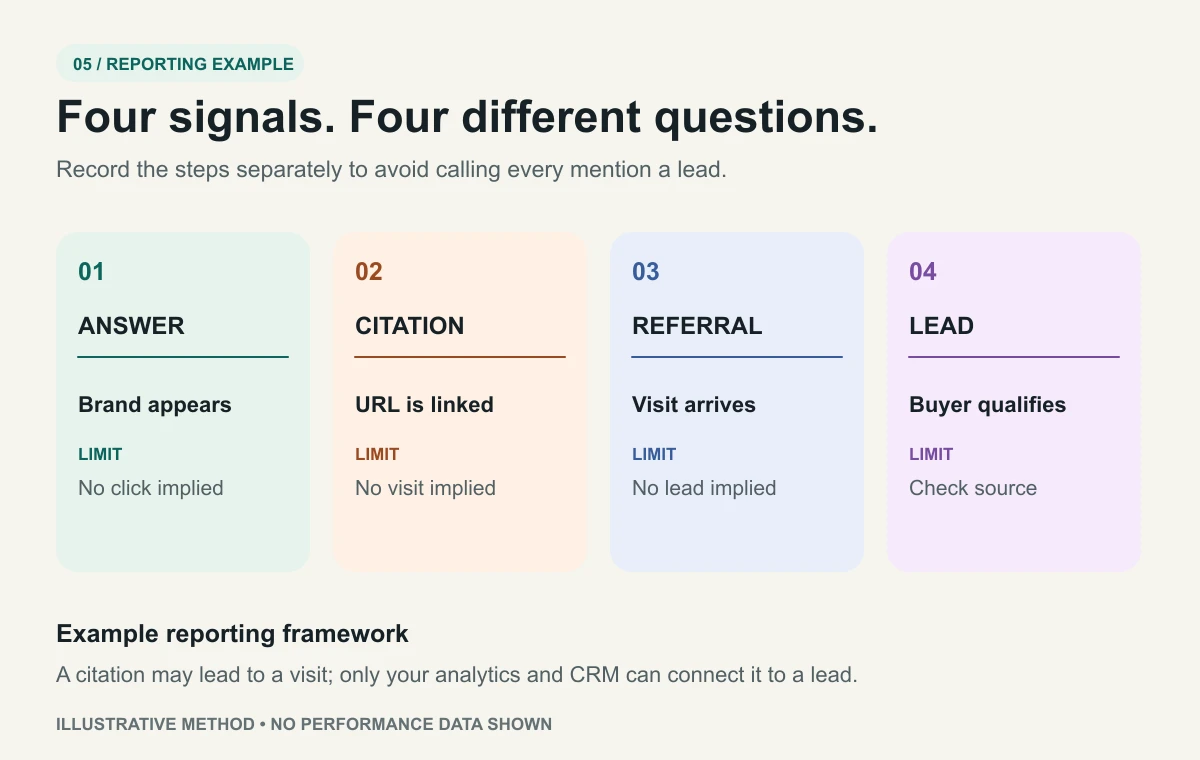
Suppose a SaaS marketing team is writing an article about how to measure AI search visibility. The reader asks which signals matter and what each one proves. The writer creates an original chart with four columns: observed answer, source citation, referral visit, and qualified lead. Beneath each label, the chart gives a one-line definition and a limitation. This is more useful than a stock image because it resolves the central confusion in the article.
The chart below is exported as ai-search-visibility-four-signals.webp. Its alt text describes the four distinct measures. The caption identifies it as an explanatory framework, not a performance result. A team using this method should document its prompt sample, observation dates, analytics rules, and CRM qualification criteria. The main article image for sharing is a separate, simpler illustration that remains clear when cropped into a social card.
After publication, the team checks the rendered page and image URL, requests indexing through its normal Search Console workflow if needed, and records baseline Web and Image search metrics. It also checks a fixed sample of buyer questions weekly. If an AI answer later cites the guide, the report records the exact URL and date; it does not assert that the chart itself caused the citation. This disciplined example shows how editorial usefulness, image optimization, and honest measurement fit together.
Sources: Image SEO best practices, AI features and your website.
Common questions about image SEO and AI search
Do image alt tags make a page appear in AI Overviews?
No single alt attribute can ensure that outcome. Descriptive alt text helps explain an image and improves accessibility; Google AI features still depend on normal Search eligibility and relevance. Write alt text because it helps people and gives useful context, then evaluate actual search and answer appearances separately.
Should every blog image have ImageObject schema?
Usually the first priority is a useful, crawlable image on a helpful page. Article markup can identify a representative image, and some structured data types use image properties for particular Search features. Add markup that truthfully describes the page; do not create a large schema graph solely to chase a presumed AI signal.
Can I include a screenshot of another website?
Review the rights, purpose, and context before publishing third-party visuals. Credit the source and avoid implying that a captured interface is your own result. Screenshots of your own product or workflow are often simpler to maintain, while a search result screenshot can be useful when the article analyzes that specific result.
How many images should a long blog have?
There is no useful fixed count. Use a thumbnail for the article and add diagrams, screenshots, charts, or examples whenever each one teaches or verifies a distinct point. Remove repeated filler. A complex tutorial may need many focused visuals; a direct answer may need fewer.
Sources: Image SEO best practices, AI features and your website, Article structured data.
Keep building a measurable search program
Read TopFound’s guide to measuring AI search visibility, or explore how a managed team can connect page improvements to observed answers and qualified leads.
Conclusion
Strong image SEO starts with a specific reader question and a visual that makes the answer easier to understand or verify. Publish that visual on an indexable page, in a real img element, beside useful text. Give it descriptive alt text, an honest caption, a stable URL, and an export that stays readable on a phone. Use metadata and structured data to identify a representative image, then inspect the rendered page to confirm what actually shipped.
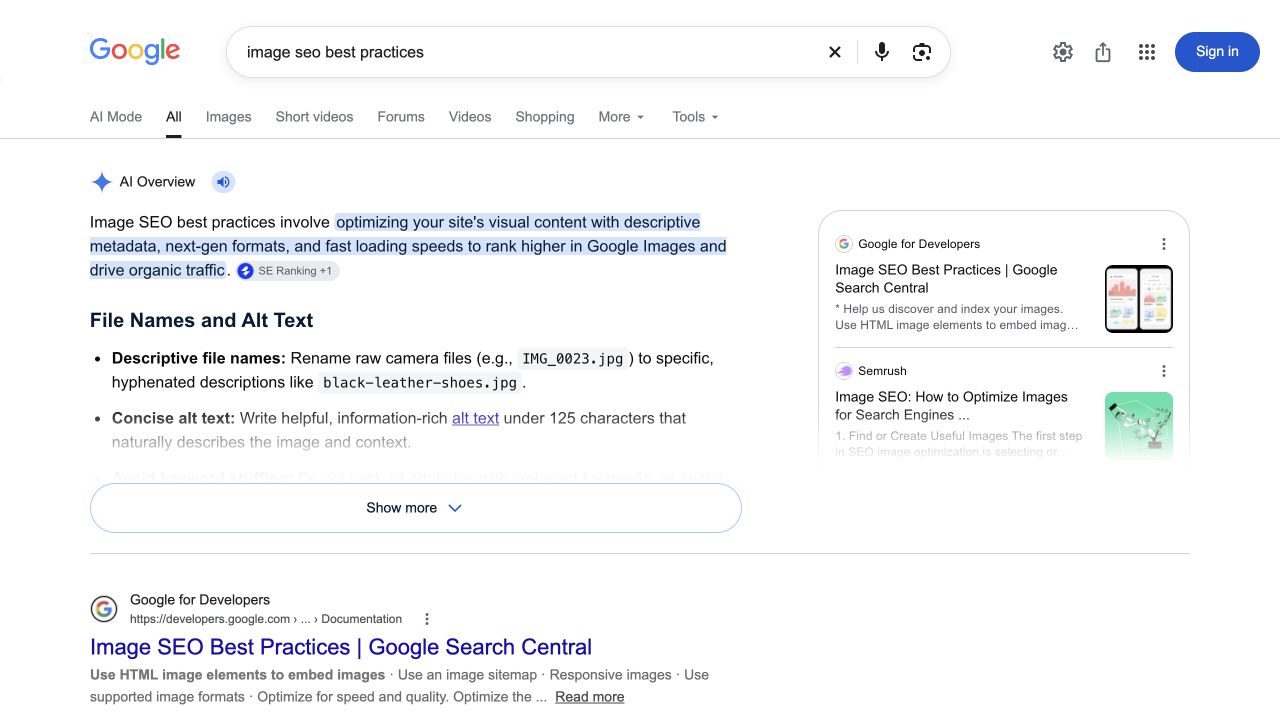
Screenshots, diagrams, and tables are most valuable when each has a job. The Google results capture in this guide separates an AI Overview from a source card and an organic result; the focused HTML visual makes the image attributes readable without a wall of browser controls. Neither visual proves a ranking. After publishing, measure Google Images, web search, observed AI citations, referrals, and leads as separate outcomes. Use those observations to improve the next article rather than promising a position in Google or an AI answer.
Your next three actions
- Choose one high-intent reader question and list the visual evidence that would genuinely clarify it.
- Publish the image with accurate text, alt, caption, responsive dimensions, and a working URL; inspect the rendered HTML.
- Record a baseline for Image search, Web search, and observed AI answers, then review the page after it has had time to be discovered.