

Key takeaways
- 1
GA4's AI Assistant default channel is a useful aggregate; Session source / medium reveals which recognized source contributed.
- 2
Validate the actual source and medium values in your property before saving a filter or custom report.
- 3
Direct, unassigned, and later return visits cannot be confidently reassigned to ChatGPT without other evidence.
GA4 screen path
From an identifiable visit to a useful decision
- 1
Traffic acquisition
Reports → Acquisition
- 2
Session source / medium
Inspect your actual values
- 3
Landing page
Find the page a visitor reached
- 4
Key event
Check the action was recorded
Before opening the report, confirm tracking works
Make sure the GA4 tag is active on the pages visitors can land on, the correct web data stream is selected, and the business action you care about is marked as a key event. If the contact or demo event is missing, a report can show visits while appearing to show no leads. Record the property timezone and comparison window.
OpenAI says ChatGPT search automatically includes the UTM parameter utm_source=chatgpt.com in referral URLs. That gives you a useful value to inspect, but redirects, consent, privacy settings, and session attribution can change what GA4 records. Do not assume a hard-coded traffic bucket is exhaustive.
Sources for this section: OpenAI: Publishers and Developers FAQ, Google: GA4 Traffic acquisition report.
Verify the property before trusting a zero
A blank ChatGPT row may mean there were no identifiable visits in the chosen period, but it can also mean the property, date range, collection setup, or report dimension is wrong. First confirm that ordinary site visits appear in the same GA4 property. Open a known landing page yourself and verify that its page_view reaches the correct data stream using the property's standard debugging tools. Then confirm the session date window and property timezone. This basic check prevents a broken tag from being mistaken for a visibility problem.
Next inspect the dimensions rather than assuming one channel name captures every visit. The AI Assistant channel groups recognized assistant referrals; Session source / medium shows the sources that GA4 actually recorded. A campaign parameter can affect the values you see, and redirects or consent behavior can change attribution. Do not write a permanent filter from a guessed medium. Export the real rows first, note their spelling, and then save a consistent filter that you can explain to another analyst.
Finally test the action you intend to call a lead. A button click is not necessarily a completed inquiry, and a form can submit while the event is missing or duplicated. Name the configured key event, verify it fires on a successful test, and check how duplicates are handled. If your sales team uses a CRM stage rather than a GA4 event, keep that stage in a separate column with its own attribution and reconciliation rules.
Sources for this section: Google: GA4 Traffic acquisition report, Google: scopes of traffic-source dimensions, Google: GA4 default channel group.
Follow the acquisition path in GA4
Google's Traffic acquisition report shows where new and returning sessions came from. Its default channel grouping now includes AI Assistant for recognized referrers. This channel excludes Google's AI Overviews and AI Mode, which are treated as Organic Search. Some properties customize Reports navigation; if Traffic acquisition is absent, an editor can add it back or use an exploration with session-scoped dimensions.
- 01
Open Traffic acquisition
Go to Reports → Acquisition → Traffic acquisition. Set the date range and compare it with the prior period if useful.
- 02
Check the AI Assistant channel
In Session default channel group, find AI Assistant to see recognized assistant referrals as an aggregate. Do not mix this with Google AI Overview traffic.
- 03
Switch to Session source / medium
Use the table's primary dimension picker. Search for chatgpt.com and note the exact source and medium rows GA4 returns.
- 04
Inspect sessions and key events
Record sessions, engaged sessions, and configured key events for those rows. Check the event name before treating it as a lead.
- 05
Inspect landing pages
Use a report or exploration that combines the session source with landing page so you can see which content received the visit.
- 06
Save the method
Record the filter, property timezone, and date range. Repeat the same query next month instead of changing the definition mid-trend.

Sources for this section: Google: GA4 Traffic acquisition report, Google: scopes of traffic-source dimensions, Google: GA4 default channel group.
What to look for on the screen
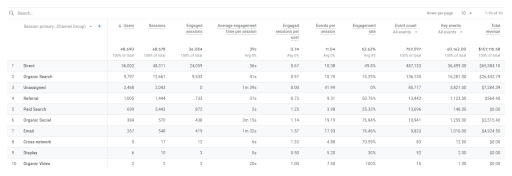
The four-step interface map near the start of this guide shows the navigation and fields to select. In the table, the row is a session source / medium, not the exact ChatGPT answer that caused the visit. Open the landing page and key event reports to learn what happened after the click. Google's documentation shows the current report path and explains that a property may have removed the report from its default view.
For a reviewable screenshot from your own property, capture the date range, the Session source / medium selector, the chatgpt.com row, and the relevant metrics together; hide private account or user details before sharing it. A screenshot of someone else's GA4 property would not establish what your site received.
Screen element
Date range
Record
Exact start and end
Watch out for
Timezone mismatch with Search Console
Screen element
Session source / medium
Record
Actual chatgpt.com row
Watch out for
Unknown and direct rows are separate
Screen element
Key events
Record
Named configured event
Watch out for
A missing setup can look like zero leads
Sources for this section: Google: GA4 Traffic acquisition report, Google: GA4 default channel group.
Read channel, source, and landing page together
Use Session default channel group when the question is how recognized AI assistant traffic compares with other acquisition channels. Use Session source / medium when the question is specifically about ChatGPT. These are session-scoped dimensions. A first-user source answers a different question about the user's earliest recorded acquisition and should not be substituted into a session report without changing the interpretation. Keep the dimension name visible in a screenshot or export so a reviewer knows which question the table answered.
Once you find a ChatGPT source row, inspect the landing pages reached by those sessions. A guide page might receive research visitors, while a service page may receive buyers ready to compare providers. Look at the page's task, call to action, and configured events before asking whether the traffic was valuable. An aggregate session total cannot tell you whether visitors saw a relevant answer on the landing page or whether a technical issue prevented a form from completing.
Google's AI Overviews and AI Mode are included in Organic Search rather than GA4's AI Assistant channel. Do not fold their traffic into a ChatGPT row or label every Organic Search visit as AI influenced. Search Console's generative AI impression report and GA4 acquisition rows can be displayed side by side, but their units and coverage differ. The former describes supported Google Search link impressions; the latter describes identifiable visits that reached your site.
Sources for this section: Google: GA4 Traffic acquisition report, Google: scopes of traffic-source dimensions, Google: GA4 default channel group.
Build a small report that leads to a decision
Use a simple monthly sheet with the GA4 property name, timezone, date range, session dimension, exact ChatGPT source value, sessions, landing page, and configured key events. Add a notes column for tagging or report changes. If the same source appears with more than one medium, show the rows first and explain your grouping rule. If the row is absent, write 'no identifiable sessions in this report and period' rather than 'ChatGPT sent no one.' The latter claims more than analytics can observe.
For a worked example, imagine an educational article receives identifiable ChatGPT sessions but no recorded demo request. The first investigation is whether the event works and whether the article offers an appropriate next step. If the event is healthy, compare the article's answer with the intent of the questions that might have led visitors there. You still cannot identify the exact ChatGPT answer from GA4 alone, so label the analysis as a landing-page hypothesis. Test a focused improvement and compare later periods using the same definitions.
Keep a separate answer-observation log if you need to know whether ChatGPT named or linked your brand for a fixed buyer question. That log requires dated consumer search answers and linked URLs. It should never be reconstructed from GA4 traffic totals. Together, the two records can tell you what was observed in answers and what visits were attributed, while remaining honest about the gap between them.
Example note: The example describes a diagnostic method, not a TopFound or client traffic result.
Sources for this section: Google: GA4 Traffic acquisition report, Google: direct traffic in GA4, OpenAI: Publishers and Developers FAQ.
Understand what the report leaves out
A person can read an AI answer and never click. Another can click, leave, and return directly days later. A redirect or privacy setting can remove referral information. GA4 cannot recover these paths from a Session source / medium row, and it cannot identify the exact answer that sent a visit.
Report identifiable ChatGPT search sessions as a conservative observed series. Keep brand mentions, cited URLs, Google AI-feature impressions, and leads in other rows with their own methods. Compare landing-page quality and key-event setup before interpreting a rise or fall in attributed traffic.
Sources for this section: Google: direct traffic in GA4, Google: GA4 Traffic acquisition report.
Troubleshoot unexpected changes in the series
When a trend moves sharply, check the measurement system before changing content. Compare report date ranges, timezone, channel definitions, tag deployment, consent settings, redirects, and campaign parameters. A site migration can alter landing-page paths; a new redirect can strip or preserve source information differently. A redesigned form can change key-event firing. Record those changes in the report alongside any editorial work so you do not attribute an instrumentation shift to improved AI visibility.
If the setup is stable, inspect which landing pages gained or lost identifiable sessions. Review whether those pages changed, whether they are still accessible, and whether the visitor task is satisfied. Use the observed answer log as a separate check for the same buyer questions. A source row is evidence of a visit, and a saved answer is evidence of one answer under recorded conditions. Neither alone is a universal measure of influence.
Common questions
What does utm_source=chatgpt.com mean?
OpenAI says ChatGPT search adds this source parameter to referral URLs. Inspect your own GA4 property to see how the resulting sessions are classified.
Can GA4 show all ChatGPT-influenced traffic?
No. It can report identifiable attributed sessions. Views without clicks, lost referrers, and later direct visits are outside that count.
Where can I find ChatGPT referral traffic in GA4?
Open Reports, then Acquisition, then Traffic acquisition. Inspect the AI Assistant channel when present, switch the table dimension to Session source / medium, and look for chatgpt.com. Check landing pages and key events before drawing conclusions from session counts.
Primary sources
These product and search-platform documents were checked on 24 September 2026. Interfaces and policies can change.
- Google: GA4 Traffic acquisition report
Current report path, session source / medium, and key events.
- Google: GA4 default channel group
AI Assistant channel, recognized referrers, and exclusions.
- Google: scopes of traffic-source dimensions
Difference between session and other acquisition dimensions.
- Google: direct traffic in GA4
Why some sessions lack a clear referral source.
- OpenAI: Publishers and Developers FAQ
ChatGPT search referral UTM parameter.
Want help applying this to your site?
Turn identifiable visits and answer observations into a repeatable measurement plan.
Explore AI Search AnalyticsRead next
Measurement guide
AI citations vs. brand mentions vs. referral trafficMeasurement guide
How to measure AI search visibility