The short answer
A Google knowledge panel is an automatically generated information box that appears when Google recognizes a search as an entity in its Knowledge Graph. A company cannot buy or submit one. You earn it with consistent, corroborated facts about the organization across the web, then claim the panel through Google and suggest corrections.
Key takeaways
- Demand notes (labeled, 2026-10-16 lock): Ahrefs Lite US — “google knowledge panel” SV 2.8K / KD 8; “wikidata seo” SV 70. Tool readouts, not a TopFound ranking or traffic forecast.
- Google says knowledge panels are generated automatically from sources across the web, and updated as that information changes.
- Claiming is a verification step for an existing panel: “Claim this knowledge panel,” then sign in to an official site or profile such as Search Console or YouTube.
- Not every panel is claimable. Unclaimed or not, corrections go through the Feedback link.
- A clear Knowledge Graph entity helps Google, and the same consistent facts help AI assistants describe your company correctly. No one can guarantee a panel.
Who this Google knowledge panel guide is for
This guide is for founders and marketers at SaaS and product companies who search their brand name and see either nothing on the right side of Google, a panel with wrong details, or a panel for a different company with a similar name. It explains what a Google knowledge panel is, how a company becomes eligible, how to claim and correct one, and why the same entity work affects what AI assistants say about you.
Page ownership: this URL owns the Google knowledge panel as a practical how-to. The broader practice of making an organization, its products, and its people consistent across the web is entity SEO, which lives on /blog/entity-seo-for-saas. A worked same-name example is /blog/what-is-topfound-entity-disambiguation. Read this page for the panel; read those for the entity program.
We describe Google’s own documented process. We do not show client panels, and nothing here is a promise that a panel will appear.
What is a Google knowledge panel?
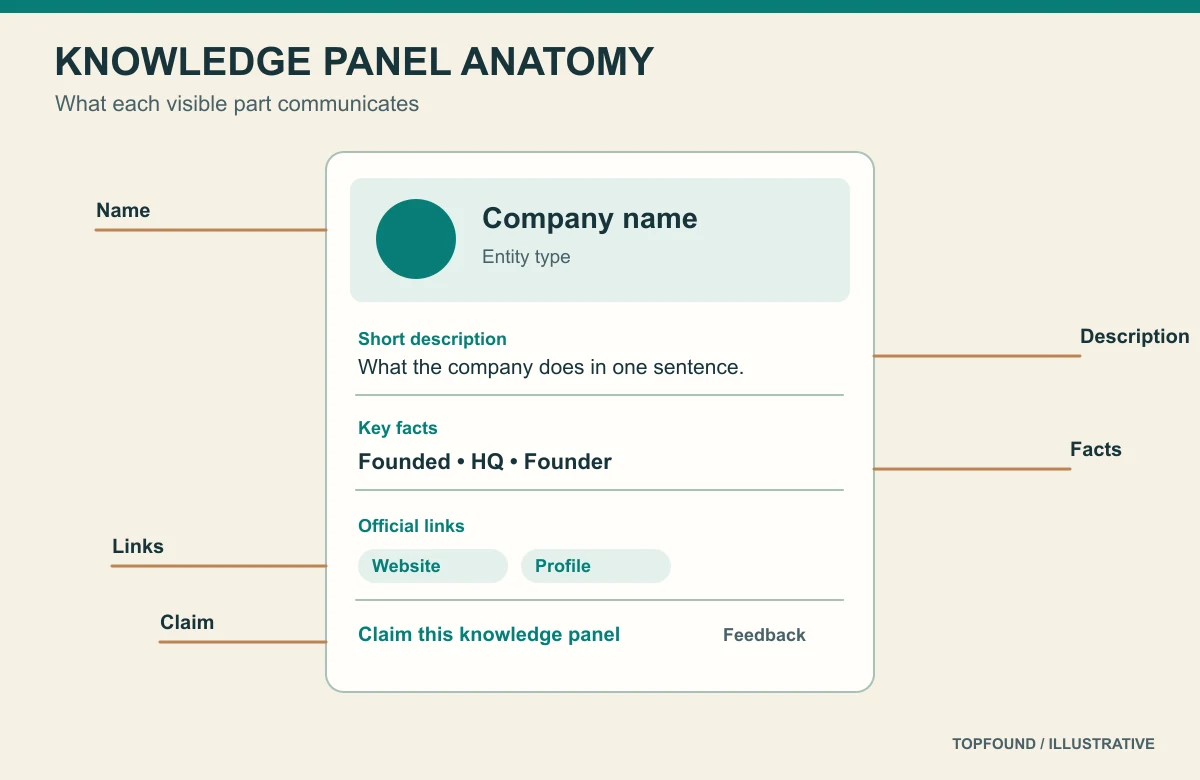
Google describes knowledge panels as information boxes that appear when you search for entities—people, places, organizations, and things—that are in the Knowledge Graph. They give a quick snapshot of a topic based on Google’s understanding of available content on the web. On desktop the panel usually sits to the right of the results; on mobile it appears near the top.
The Knowledge Graph is Google’s database of entities and the relationships between them, introduced in 2012 with the phrase “things, not strings.” A knowledge panel is the visible face of one entity in that graph. If Google does not hold your company as a distinct entity, there is no panel to show and nothing to claim.
Google says panels are generated automatically and that information comes from various sources across the web, sometimes combined with data from partners on specific topics. They update automatically as information changes, and Google also considers changes from the entities themselves and from general user feedback.
Knowledge panel vs Business Profile
| Google knowledge panel | Google Business Profile | |
|---|---|---|
| Who it is for | Entities: organizations, people, products, places, works | Businesses serving customers at a location or service area |
| How it is created | Generated automatically from the Knowledge Graph | Created or claimed by the business |
| How you manage it | Claim the panel, then suggest edits | Edit the profile directly |
| Typical SaaS fit | Yes, for the company as an organization | Only if you serve customers locally |
Sources: Knowledge Panel Help: About knowledge panels, Google: Introducing the Knowledge Graph — things, not strings.
Why a Google knowledge panel matters for AI answers
A knowledge panel is a signal that Google has resolved your name to one entity with stable facts. That matters beyond the panel itself. AI assistants such as Google AI Mode, ChatGPT search, Perplexity, and Claude build answers from pages they retrieve. When your homepage, about page, profiles, directories, and reference sources all agree on what the company is, an assistant has one consistent description to repeat. When they disagree, or when a same-name company dominates, assistants mix the two up.
We cannot claim that a panel causes AI citations; no engine documents that. The practical point is narrower: the work that earns a panel—clear identity, consistent facts, corroboration from independent sources—is the same work that reduces wrong descriptions in AI answers. Google’s own guidance on generative AI features also warns against pursuing inauthentic mentions, so the corroboration has to be real.
This is also why brand monitoring and entity work belong together. If you track how assistants describe you (see /blog/ai-brand-monitoring), a wrong description is often an entity problem that a knowledge panel audit will surface.
Sources: Optimizing for generative AI features.
How to get a Google knowledge panel for a company
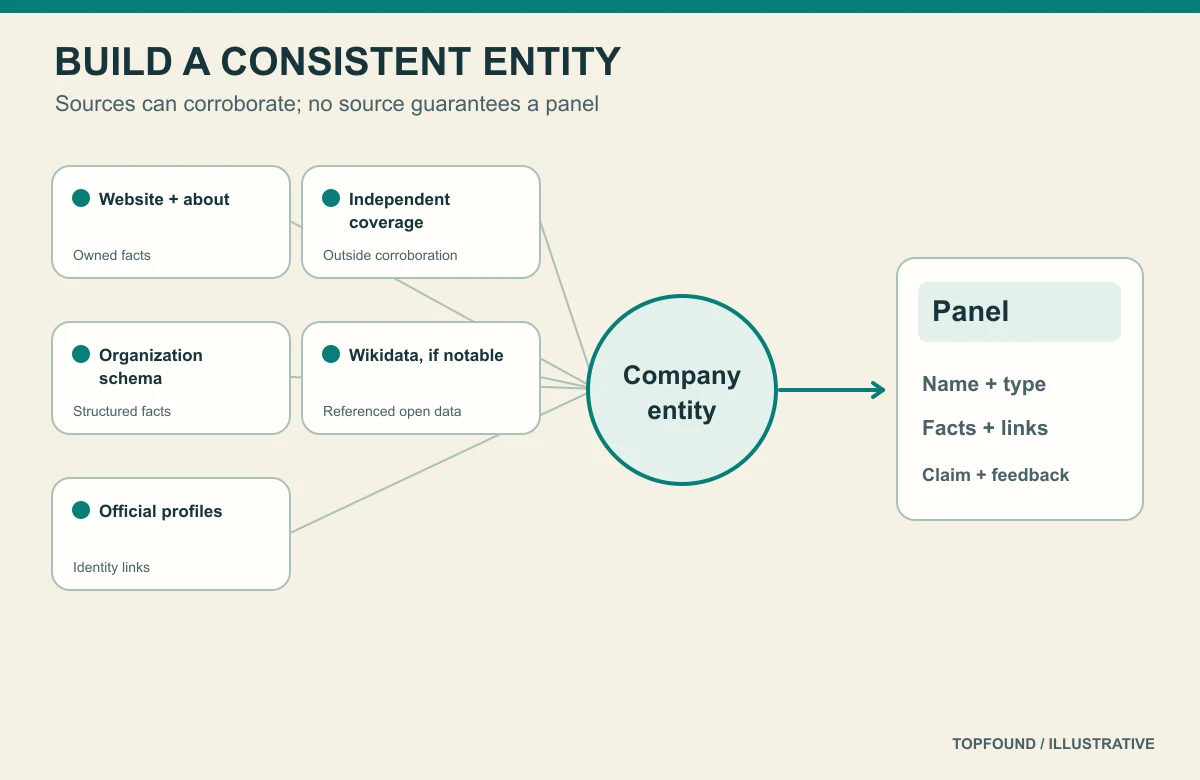
There is no form to request a knowledge panel. You make your organization easy to recognize as one entity, and you make its facts easy to corroborate. These are the steps we follow for TopFound’s own brand.
Seven steps toward a company knowledge panel
- Fix one canonical name and one one-sentence description, and use them everywhere you control: homepage, about page, footer, social profiles, directories.
- Publish a real about page that states what the company does, when and where it was founded, who runs it, and how to contact it.
- Add Organization structured data on the home page with name, url, logo, and sameAs links to your official profiles. Keep it consistent with the visible page.
- Claim and complete official profiles that you control (LinkedIn company page, YouTube, X, Crunchbase or similar) with the same name and description.
- Earn independent coverage: articles, interviews, partner pages, and reviews that describe the company in their own words.
- Consider a Wikidata item only if the company meets Wikidata’s notability policy, with serious, publicly available references.
- Check whether Google already holds the entity using the Knowledge Graph Search API, and search your brand regularly to see when a panel appears.
Sources: Organization structured data, Google for Developers: Knowledge Graph Search API, Wikidata: Notability policy.
How to claim a Google knowledge panel
Claiming does not create a panel; it verifies that you officially represent the entity behind an existing one. Google’s Help Center lists the steps below. Google notes that not all knowledge panels are claimable yet and suggests checking periodically for the claim option.
If Google cannot identify sites associated with you, you may be asked for more information. If the panel is already claimed by someone else in your organization, you can be added as a user; if you cannot find the current owner, Google describes an account recovery process through Knowledge Panel Support.
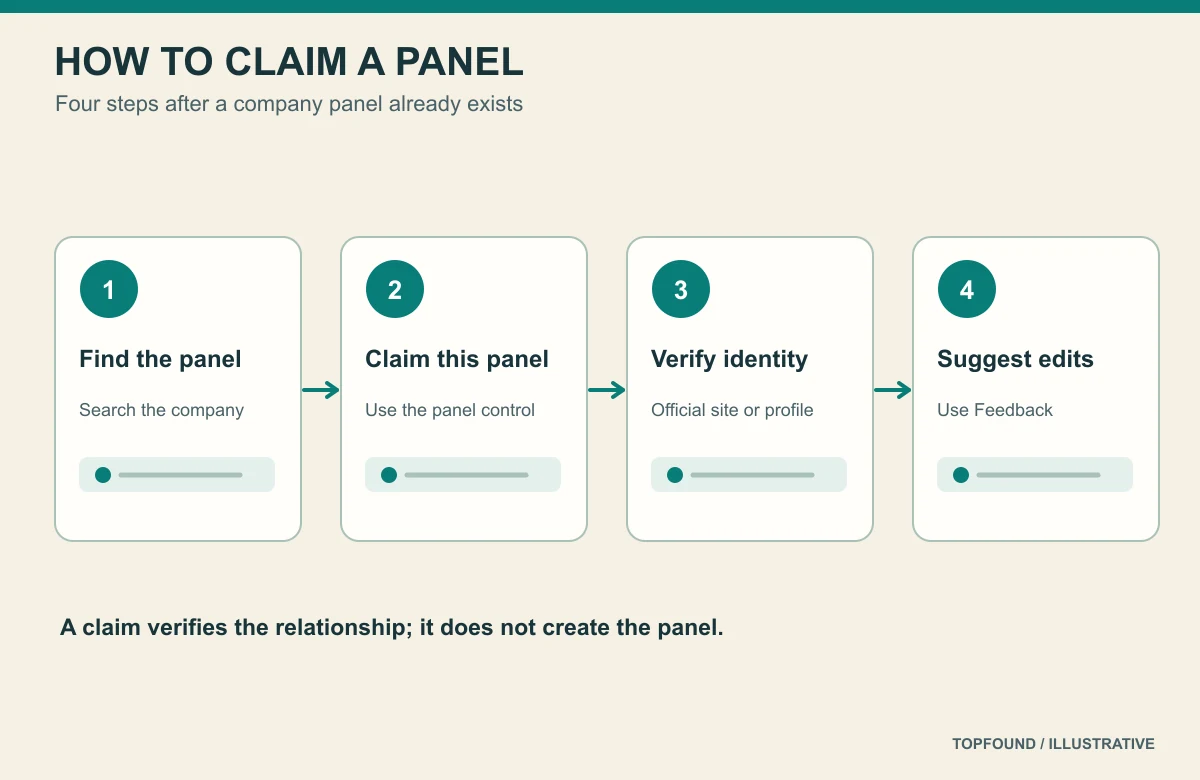
Claim steps (from Google’s Knowledge Panel Help)
- Sign in to a Google Account.
- Search Google for your company and find its knowledge panel.
- At the bottom of the panel, select “Claim this knowledge panel” (on mobile it may sit in the menu or About section).
- Review the information shown.
- Sign in to one of the official sites or profiles listed, such as Search Console for your website, YouTube, X (Twitter), or Facebook.
- After verification, add teammates as owners, managers, or contributors from the contributions management page.
How to update or correct a knowledge panel
Once verified, you suggest changes; you do not edit the panel directly. Google’s process is to open the panel while signed in with the verified account, select Feedback, flag the fact to change, describe the correct value, and include links to web pages that verify it. Verified feedback gets priority review, and you receive a confirmation email.
If you are not the official representative, anyone can still use the Feedback link to suggest edits for review. Either way, the strongest argument for a correction is a public source that already states the correct fact. Update your own pages first, then submit the panel feedback that points to them.
Google lists specific troubleshooting cases worth knowing: content mixed with another entity of the same or similar name, wrong websites or profiles, and panels already managed by someone else. For same-name collisions, the disambiguation work in /blog/what-is-topfound-entity-disambiguation applies directly.
Sources: Knowledge Panel Help: Get verified on Google, Knowledge Panel Help: About knowledge panels.
Wikidata SEO: where Wikidata fits, and where it does not
Wikidata describes itself as a free, collaborative, multilingual, secondary knowledge base that collects structured data, maintained by a volunteer community. Many search and AI systems use open knowledge bases as one source among many, which is why “wikidata seo” comes up in knowledge panel discussions. Google does not publish a rule that a Wikidata item creates a panel, and we do not claim one.
Wikidata has a notability policy. An item is acceptable if it has a valid sitelink to a Wikimedia page such as Wikipedia, if it describes a clearly identifiable entity that can be described using serious and publicly available references, or if it fills a structural need. A new SaaS company with no independent coverage usually does not meet that bar, and an item created only for marketing is likely to be challenged.
If your company does qualify, keep the item factual: official name, instance of (business or company), official website, inception date, headquarters, and identifiers for official profiles, each with a reference. Do not add promotional descriptions. Treat Wikidata as a reference record that should match your own site, not as a shortcut around earning coverage.
Wikidata do and don’t for companies
| Do | Don’t |
|---|---|
| Check notability first | Create an item with no independent references |
| Use the same name and website as your site | Use a tagline or keyword-stuffed label |
| Reference every statement | Cite only your own marketing pages |
| Disclose conflicts of interest where the community asks | Edit anonymously to look independent |
Sources: Wikidata: Introduction, Wikidata: Notability policy.
Common knowledge panel mistakes
- Paying for a “guaranteed knowledge panel.” Google generates panels automatically; no vendor controls that.
- Using different company names or descriptions across the site, profiles, and directories.
- Adding Organization schema that disagrees with the visible about page.
- Creating a Wikidata item or Wikipedia article that does not meet the community’s rules.
- Trying to edit facts without first fixing the public pages that state them.
- Ignoring a same-name collision until it shows up in AI answers.
How to check progress without inventing a score
Search your exact brand name on desktop and mobile, signed out, and record whether a panel appears, which entity it shows, and whether the facts are right. Repeat monthly. Use the Knowledge Graph Search API to see whether Google returns an entity for your name and what type it assigns.
For AI answers, ask the same branded questions in Google AI Mode, ChatGPT, Perplexity, and Claude on a schedule and log the description each gives. The method is on /blog/ai-brand-monitoring. Treat panel presence and AI description accuracy as separate rows rather than one combined score.
Where managed help starts
Teams can follow this guide in-house. Teams that want TopFound to audit entity consistency, fix the facts, and track how Google and AI assistants describe the company can start with /services/entity-optimization or a free AEO report at /aeo-report. Public plans are on /pricing: Growth $797/month, Scale $1,297/month, and Custom scoped. We do not sell or guarantee knowledge panels.
FAQ
What is a Google knowledge panel?
A Google knowledge panel is an automatically generated information box that appears for entities in Google’s Knowledge Graph, such as companies, people, and places. Its facts come from sources across the web.
How do I get a Google knowledge panel for my company?
You cannot request one. Make the company a clear, consistent entity—one name, an about page, Organization structured data with sameAs, official profiles, and independent coverage—and Google may create a panel when it recognizes the entity.
How do I claim my Google knowledge panel?
Sign in to Google, find the panel, select “Claim this knowledge panel,” and verify by signing in to an official site or profile such as Search Console or YouTube. Not all panels are claimable yet.
How do I edit a Google knowledge panel?
After verifying, open the panel, select Feedback, flag the fact, describe the correction, and link to public pages that confirm it. Unverified users can also suggest edits through Feedback.
Is a knowledge panel the same as a Google Business Profile?
No. Business Profiles are for businesses serving customers at a location or service area and are created by the business. Knowledge panels are generated for entities in the Knowledge Graph.
Do I need Wikidata or Wikipedia to get a knowledge panel?
Google does not state that either is required. They are common reference sources, but both have notability rules, and items created only for marketing are likely to be removed.
Does a knowledge panel help with ChatGPT and AI answers?
No engine documents a direct link. The entity work that earns a panel—consistent, corroborated facts—also helps AI assistants describe your company accurately.
Where does TopFound fit?
TopFound (topfound.io) is a managed AEO / AI SEO agency. This guide is an explainer, not a case study, and we do not sell knowledge panels. A soft next step is /aeo-report.
Earn the entity, then claim the panel
Use the entity SEO guide for the full practice and the disambiguation case study for same-name problems. TopFound (topfound.io) does not promise or sell knowledge panels.
Conclusion
A Google knowledge panel is the result of Google recognizing your company as one entity, not a listing you can submit. Earn it with a single name and description, a real about page, honest Organization markup, consistent profiles, and independent coverage; add Wikidata only if you meet its rules. When a panel appears, claim it through Search Console or another official profile and correct facts through Feedback with public sources.
The same consistency is what AI assistants rely on when they describe your brand. For the full entity program, continue to /blog/entity-seo-for-saas; for same-name problems, /blog/what-is-topfound-entity-disambiguation.
Sources: Knowledge Panel Help: About knowledge panels, Knowledge Panel Help: Get verified on Google.