
The short answer
AI Overview tracking is monitoring when Google’s AI Overviews appear for your target queries, whether they link to your pages, and what traffic follows. Use Search Console’s Generative AI performance report for first-party impressions by page, a dated query log for which queries and competitors appear, and third-party trackers only as labeled samples.
Key takeaways
- Demand note (labeled, 2026-10-30 lock): Ahrefs Lite US, 2026-10-29 — “ai overview tracking” SV 1.2K / KD 34. A tool readout, not a TopFound traffic forecast.
- Search Console’s Generative AI performance report (rolled out to all sites by Aug 31, 2026) shows impressions in AI Overviews and AI Mode by page, country, device, and date. Google’s help page documents no query dimension, no clicks, and no split between AI Overviews and AI Mode.
- Clicks from AI Overviews are counted in the normal Performance report under the Web search type, and every link inside one AI Overview gets that AI Overview’s single position.
- A Search generative AI control in Search Console decides whether your site can appear in AI Overviews and AI Mode at all. Include is the default; check it before you debug anything else.
- Google’s spam policies say scraping results for rank-checking without permission violates its terms, and Google says no third-party tool has access to its internal ranking or AI systems. Treat tracker data as a sample and ask vendors how they collect it.
- The tracking setup that holds up: first-party Search Console data, a frozen query set, and a dated log that keeps “AI Overview shown”, “we were cited”, and “we got the click” on separate rows.
Who this guide is for
This guide is for SaaS marketers and SEO leads who have been asked a simple-sounding question: are we showing up in Google’s AI Overviews? It covers what Google itself now reports, what it does not, how third-party trackers fit, and a weekly routine that produces numbers you can defend in a meeting.
Every statement about Search Console and Google’s policies comes from Google’s own help pages and Search Central documentation, fetched on October 30, 2026. Google changes these reports, so check the linked pages before you rebuild a dashboard around them. Where Google has not documented something, we say so rather than guess.
Page ownership: this URL owns AI Overview tracking, meaning how to monitor and record AI Overview (and AI Mode) presence. How to improve your chances of appearing lives on /blog/how-to-show-up-in-ai-overviews. Cross-engine analytics and platform buying live on /blog/ai-search-analytics. The client-facing report format lives on /blog/ai-visibility-report.
What is AI Overview tracking?
AI Overview tracking is the practice of recording, over time, when Google shows an AI Overview for the queries you care about, whether that AI Overview links to your pages, which other sites it links to, and whether any of that turns into visits. Google AI Overviews tracking is a narrower job than general AI visibility work. It is about one surface, Google Search, and two features in it: AI Overviews and AI Mode.
Three questions sit inside that definition and they need different data. Did an AI Overview appear at all? Were we one of its links? Did anyone click? Google’s own documentation says AI Overviews are only shown when its systems decide they add something beyond classic results, and that they often don’t trigger. So the first question matters: a query with no AI Overview is not a query where you lost an AI citation.
Tracking is also not optimizing. Tracking tells you where you stand and whether a change moved anything. The work that improves your odds of being linked, such as answer-ready pages, entity clarity, and eligibility checks, is covered in /blog/how-to-show-up-in-ai-overviews.
AI Overview tracking vs nearby jobs on this site
| Job | Question it answers | Where it lives |
|---|---|---|
| AI Overview tracking | When do AI Overviews show, do they link to us, and what follows? | This page |
| AI Overview optimization | How do we make our pages more likely to be linked? | /blog/how-to-show-up-in-ai-overviews |
| AI search analytics | How do we measure presence across ChatGPT, Perplexity, Gemini, and Google? | /blog/ai-search-analytics |
| AI visibility report | How do we present it to leadership or a client? | /blog/ai-visibility-report |
Sources: AI features and your website (fetched Oct 30, 2026).
What Search Console now shows for AI Overview tracking
Start with Google’s own data, because it is first-party, free, and built from real searches rather than samples. There are now two places to look.
The Performance report. Google’s AI features page says sites appearing in AI Overviews and AI Mode are included in overall search traffic and reported in the Performance report under the Web search type. Its metrics help page explains the counting. Clicking a link to an external page in an AI Overview counts as a click. Standard impression rules apply. An AI Overview occupies a single position in the results, and every link inside it gets that same position. In AI Mode, position follows the normal results-page method, and a follow-up question counts as a new query. Search Labs experiments are not included.
The Generative AI performance report. On June 3, 2026, Google announced dedicated Generative AI performance reports in Search Console, first for a subset of sites. Its help page says they reached all websites worldwide by August 31, 2026. The Search version shows impressions from AI Overviews and AI Mode. You can group them by Pages (the final URL linked, usually the canonical), Countries, Dates, and Devices, and filter by two search types: Web text-based, and Web multimodal for Lens, Circle to Search, and other image searches. The usual Performance report limits, such as the 1,000-row cap, apply, and you can export the chart and table.
If you do not see the report, Google gives two likely reasons: the site has not had enough generative AI impressions, or it has been excluded from Search generative AI features. That second reason points to a setting worth checking first.
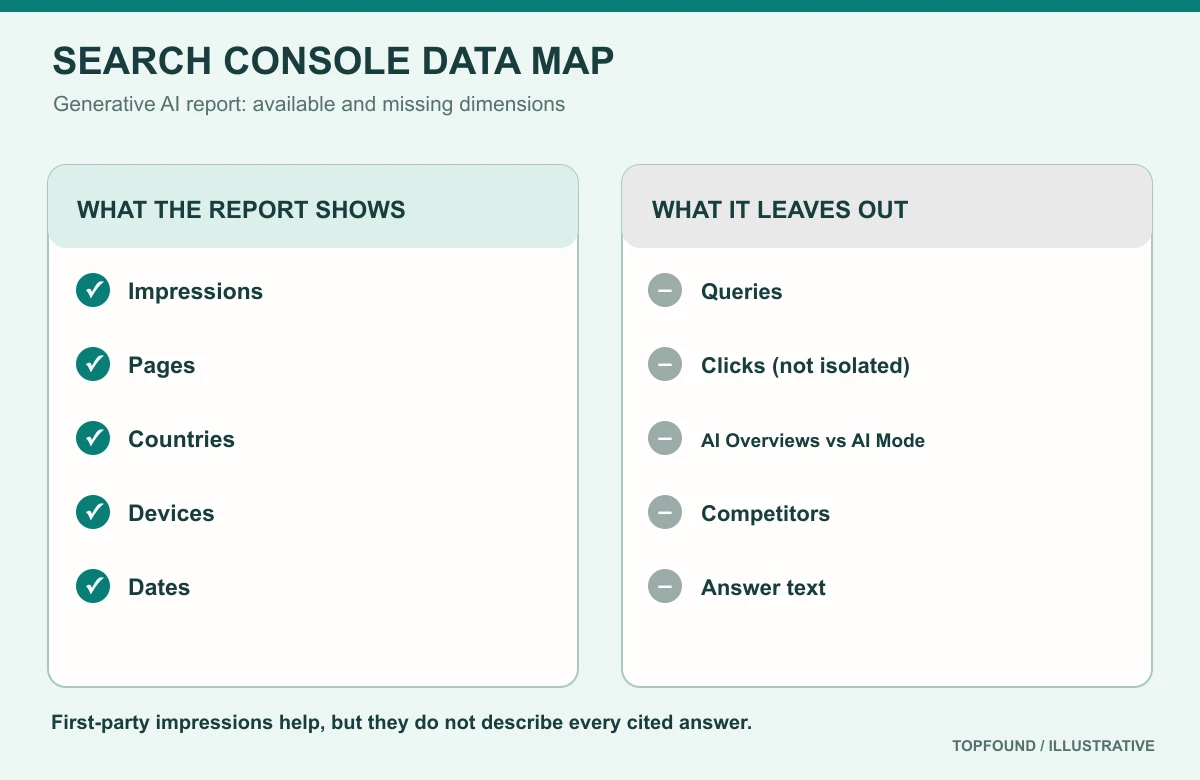
AI Overview tracking questions vs what Search Console documents (Oct 30, 2026)
| Question | Search Console answer | Where |
|---|---|---|
| How many impressions did our links get in AI Overviews and AI Mode? | Yes, as a combined total | Generative AI performance report |
| Which of our pages were shown? | Yes, Pages dimension | Generative AI performance report |
| Which countries and devices? | Yes | Generative AI performance report |
| AI Overviews vs AI Mode separately? | Not documented as a split | — |
| Which queries triggered an AI Overview with our link? | No query dimension documented | — |
| Clicks from AI Overviews? | Included in Web totals, not isolated | Performance report (Web) |
| Which competitors were linked? | No | — |
Sources: Search Console Help: Generative AI performance report (Search) (fetched Oct 30, 2026), Google Search Central Blog: Introducing Search Generative AI performance reports (June 3, 2026), Search Console Help: What are impressions, position, and clicks? (fetched Oct 30, 2026), AI features and your website (fetched Oct 30, 2026).
Check the Search generative AI control before you track anything
Search Console has a Search generative AI control under Settings. It decides whether your site’s links and content can appear in AI Overviews, AI Mode, and generative AI features in Google Discover. The options are Include, which is the default for all properties, Exclude, and Inherit from a parent property. Google says exclusion generally takes effect within one to two days, with some content taking longer because of caching.
Two details matter for tracking. First, Google says the control only affects those generative AI features and is not used as a ranking or inclusion signal for the rest of Search. Second, it does not control AI training; Google points to Google-Extended for that. So if your AI Overview impressions drop to zero overnight, check whether someone changed this setting, or whether a child property overrides its parent, before you blame content or an algorithm update.
Five-minute control check
- Open Search Console for your domain property and go to Settings, then Search generative AI.
- Confirm the control is Include (or Inherit from a parent set to Include).
- Check URL-prefix child properties, such as a blog or docs folder, for overrides.
- Write the setting and the date in your tracking log so later changes are visible.
Sources: Search Console Help: Search generative AI control (fetched Oct 30, 2026), Search Console Help: Generative AI performance report (Search) (fetched Oct 30, 2026).
What first-party data can’t tell you
Search Console answers the “how much” question for your own pages. It does not answer the “for what” and “against whom” questions that most teams actually ask. Google’s help page for the Generative AI report documents no query dimension, so you cannot see which searches produced those impressions. It documents no split between AI Overviews and AI Mode. It shows nothing about other sites. And clicks from AI Overviews sit inside your Web totals, not in a separate column.
That leaves three gaps. You do not know which of your target queries trigger an AI Overview. You do not know which competitors are linked when you are not. And you cannot read what the AI Overview actually said about your product. Those gaps are why a query-level log still matters, even with first-party data in hand.
There is one more trap. An impression means a link to your site was shown, not that the AI Overview recommended you, described you correctly, or put your link where people look. Treat impressions as presence, and keep framing and accuracy for the manual review described below.
Sources: Search Console Help: Generative AI performance report (Search) (fetched Oct 30, 2026), Search Console Help: What are impressions, position, and clicks? (fetched Oct 30, 2026).
Three tracking methods, compared
Most teams end up combining three sources. Each answers a different question, and none of them answers all of them.
Search Console is first-party. It covers real searches and real impressions, and it is free. Its limits are the ones above: no queries in the generative AI report, no competitors, no answer text.
SERP trackers are third-party tools that run queries on a schedule from chosen locations and devices and record SERP features, often including whether an AI Overview appeared and which URLs it linked. Their strength is query-level and competitor-level detail. Their weaknesses are sampling and method. Each run is one snapshot from one location and device. Google’s guide warns that no third-party tool has access to its internal ranking or AI systems. And Google’s spam policies say sending automated queries to Google, including scraping results for rank-checking without express permission, violates its policies and Terms of Service. If you buy one, ask the vendor how its data is collected and treat the output as a labeled sample.
A manual query log is the slowest method and the most honest. Someone runs a fixed set of queries by hand on a set schedule and records what they saw. It doesn’t scale to thousands of queries, but for the 20 to 50 queries that matter to a SaaS pipeline it gives you answer text, framing, and competitor links that no report provides.
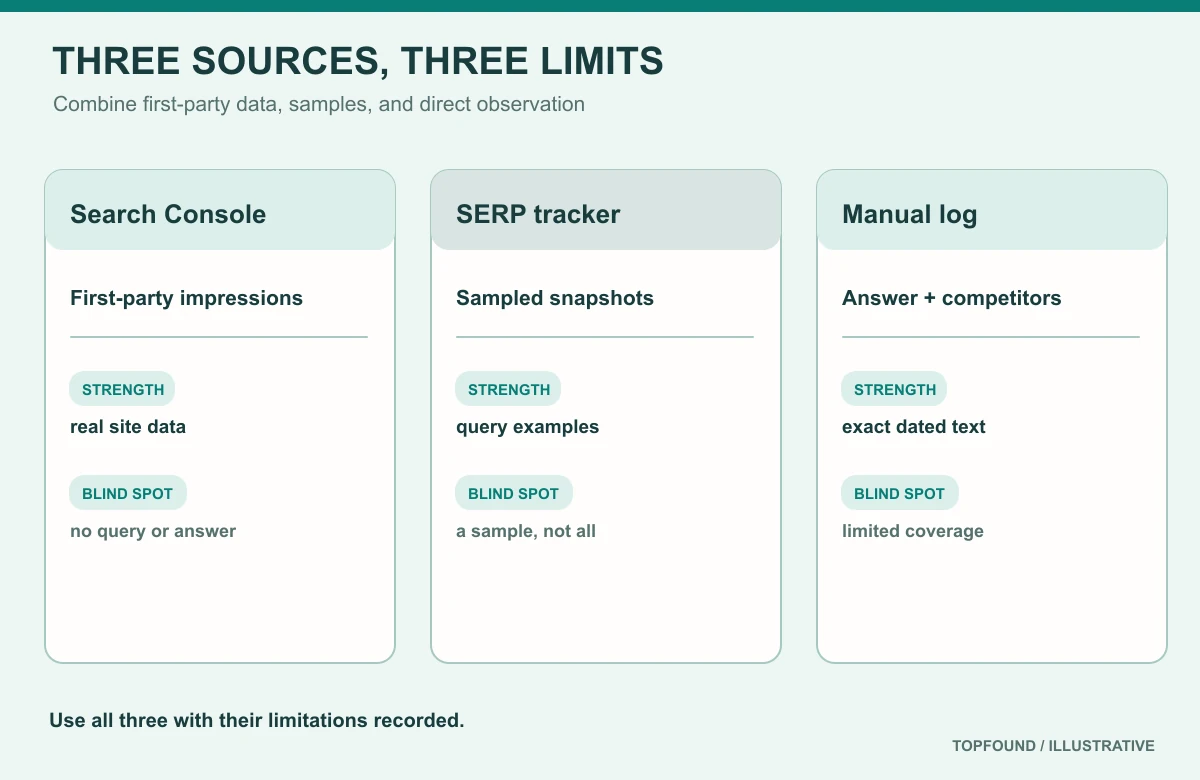
AI Overview tracking methods
| Method | Best for | Blind spots | Cost |
|---|---|---|---|
| Search Console (Generative AI + Performance reports) | Real impressions by page, country, device, date | No queries, competitors, or answer text; clicks not isolated | Free |
| SERP tracker with AI Overview capture | Query-level presence and competitor links at scale | Sampled snapshots; collection method varies; not Google data | Paid |
| Manual dated query log | Answer text, framing, accuracy, screenshots | Small sample; labor; personalization and location effects | Time |
Sources: Optimizing your website for generative AI features (fetched Oct 30, 2026), Spam policies — machine-generated traffic, Search Console Help: Generative AI performance report (Search) (fetched Oct 30, 2026).
How to set up AI Overview tracking in one afternoon
You can build a working setup without buying anything. The goal is a baseline you can compare against in four weeks, not a perfect system.
Build the query set from evidence, not guesses. Pull your top queries for key pages from the Performance report, add the questions sales and support hear every week, and add a handful of category and comparison queries such as “best [category] for [audience]” or “[product] vs [competitor]”. Freeze the list. If you change it later, record the change with a date.
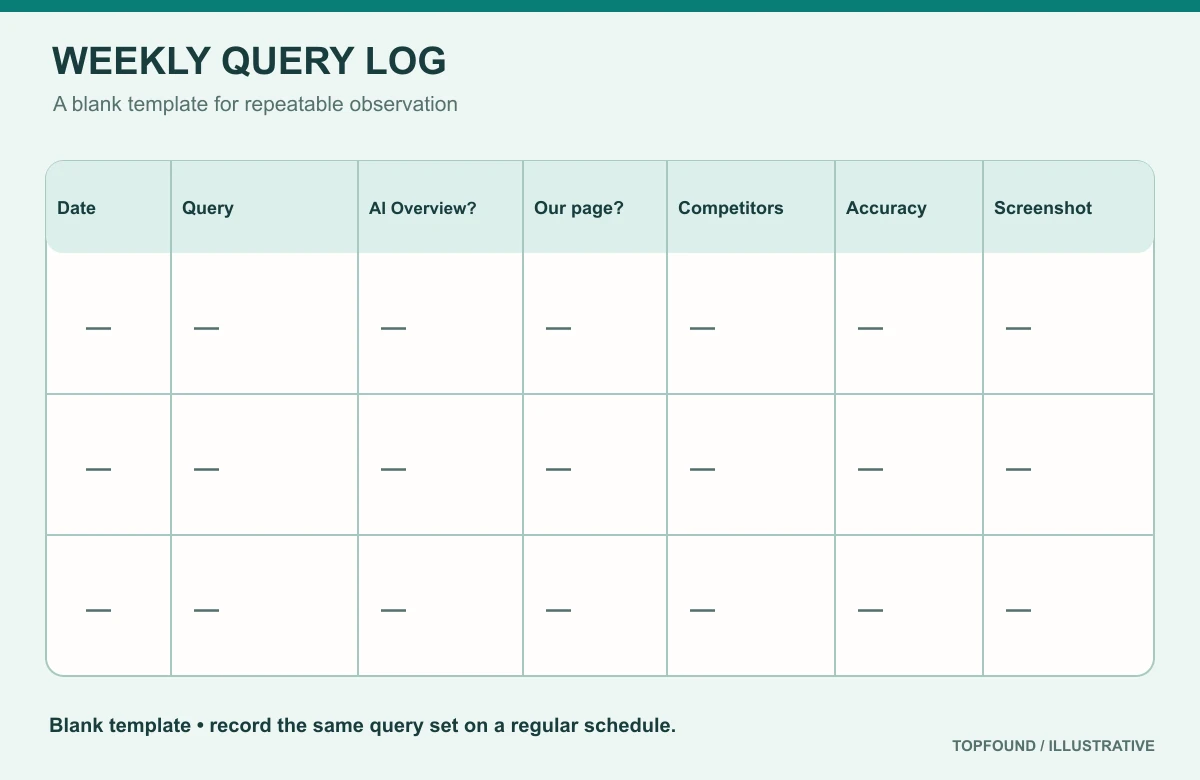
AI Overview tracking setup
- Confirm the Search generative AI control is set to Include and note the date.
- Export the Generative AI performance report by Pages for the last three months as your baseline.
- Export the Performance report (Web) for the same pages and dates so impressions and clicks can be read side by side.
- Write a frozen set of 20 to 50 queries from Search Console, sales calls, and support tickets.
- Choose one location and device setup for the manual log and keep it fixed. Use a logged-out or clean browser profile where you can, and record what you used.
- Run the log weekly. Record the fields in the next section for every query.
- Each month, put the three sources side by side and write one paragraph on what changed and what you shipped.
Sources: Search Console Help: Generative AI performance report (Search) (fetched Oct 30, 2026), Search Console Help: Search generative AI control (fetched Oct 30, 2026).
What to record in your tracking log
Keep each observation as its own column. The most common reporting mistake is folding “AI Overview appeared”, “we were linked”, and “we got traffic” into one score. Those facts move for different reasons and need different fixes.
AI Overview tracking log fields
| Field | Example value | Why it matters |
|---|---|---|
| Date and time | 2026-11-02 10:00 IST | Results change over time |
| Query | best onboarding tool for B2B SaaS | Frozen list only |
| Location, device, signed-in state | US, desktop, logged out | Results vary by setup |
| AI Overview shown? | Yes / No | No AI Overview is not a loss |
| Our page linked? | Yes, /pricing | Presence, not endorsement |
| Competitors linked | Two named domains | Shows who wins when you don’t |
| What it said about us | Accurate / outdated / wrong | Accuracy is a separate fix |
| Classic organic position | Noted separately | Never averaged in |
| Screenshot reference | File name | Evidence for later review |
How to read AI Overview tracking data without fooling yourself
Compare like with like. The Generative AI report’s impressions and the Performance report’s Web impressions overlap; the AI figure is a subset view, not extra traffic. When AI impressions for a page rise while its clicks stay flat, that is worth noting, but it does not prove AI Overviews took the clicks. Seasonality, ranking changes, and a new competitor can all do the same.
Be careful with position. Because every link in an AI Overview shares the AI Overview’s single position, a page that appears there can show a better average position without a change in the classic ranking. Google’s own metrics page warns that position is a complex metric that can mislead. Watch changes over time rather than single values.
Here is what labeled first-party data looks like on TopFound’s own small site. In Google Search Console for September 30 to October 27, 2026, the site as a whole had 7 clicks and 16,735 impressions at an average position of 57.5. Our /blog/google-ai-mode post earned 1,950 impressions for “google ai mode” at an average position of 11.6. Those are Performance report numbers. They do not tell us how many of those impressions came from AI Overviews, which is exactly why the Generative AI report and a query log are worth adding. These are our own readouts, not benchmarks for anyone else.
Sources: Search Console Help: What are impressions, position, and clicks? (fetched Oct 30, 2026), Search Console Help: Generative AI performance report (Search) (fetched Oct 30, 2026).
Tracking AI Mode alongside AI Overviews
AI Mode is a separate, conversational experience in Google Search. Google says AI Mode and AI Overviews may use different models and techniques, so the responses and links they show will vary. For AI Mode tracking, that means one query can give different results in the two features, and you should log them as separate rows.
Two counting rules from Google’s metrics page matter here. A follow-up question in AI Mode counts as a new query in Search Console. And the Generative AI performance report combines AI Overviews and AI Mode impressions, with no split documented. For a manual log, decide up front whether you will check AI Mode for each query, and record which feature you checked. Our /blog/google-ai-mode guide covers how AI Mode works and how to open it.
Sources: AI features and your website (fetched Oct 30, 2026), Search Console Help: What are impressions, position, and clicks? (fetched Oct 30, 2026), Search Console Help: Generative AI performance report (Search) (fetched Oct 30, 2026).
Choosing a tracking tool for AI Overviews
If your query set grows past what one person can check by hand, a tool can help. Some SEO rank trackers and AI-visibility platforms advertise AI Overview capture; check what each one actually records. Judge them on method, not dashboards. Ask these questions before you buy, and write the vendor’s answers into your log notes so the data stays labeled.
Questions to ask an AI Overview tracking vendor
- How do you collect AI Overview data, and how does that square with Google’s policy on automated queries?
- Which locations, languages, and devices do you sample, and how often?
- Do you store the linked URLs and the answer text, or only a yes/no flag?
- Do you track AI Mode separately from AI Overviews?
- Can I export raw rows with timestamps, not just a score?
- Do you claim any access to Google’s internal data? Google says no third-party tool has it.
Sources: Optimizing your website for generative AI features (fetched Oct 30, 2026), Spam policies — machine-generated traffic.
Common tracking mistakes
- Counting a query with no AI Overview as a lost citation.
- Reporting one blended “AI score” instead of separate shown, linked, and clicked rows.
- Comparing Generative AI impressions with Web impressions as if they were separate traffic.
- Changing the query set every week without a dated note.
- Forgetting to check the Search generative AI control after a drop.
- Treating a tracker’s single snapshot as what every searcher saw.
- Mixing locations, devices, and signed-in states in the manual log.
- Averaging AI Overview presence into classic rank reports.
Where managed help starts
Teams can run this tracking themselves. Teams that want TopFound to set up the query set, run the dated log across Google AI Overviews, AI Mode, ChatGPT, and Perplexity, and turn gaps into page fixes can start with a free AEO report at /aeo-report or the AI search analytics service at /services/ai-search-analytics. Public plans are on /pricing: Growth $797/month, Scale $1,297/month, and Custom scoped.
FAQ
What is AI Overview tracking?
AI Overview tracking is recording, by date, whether Google showed an AI Overview for a query, whether it linked to your page, which competitors it linked, and what traffic followed, with each kept as a separate fact.
Can I track AI Overviews in Google Search Console?
Partly. The Generative AI performance report shows impressions in AI Overviews and AI Mode by page, country, device, and date. Google’s help page documents no query dimension, no clicks, and no split between the two features.
Does Search Console show clicks from AI Overviews?
Clicks on links in AI Overviews count as clicks and are included in the Performance report’s Web search type. Google does not document a way to isolate them from other Web clicks.
What position does a link in an AI Overview get?
Google says an AI Overview occupies a single position in the results, and every link inside it is assigned that same position.
Why can’t I see the Generative AI performance report?
Google gives two common reasons: the site has not had enough impressions in generative AI features, or it has been excluded through the Search generative AI control in Settings.
Are AI Overview rank trackers accurate?
They are samples. Each check is one snapshot from one location and device, collection methods vary, and Google says no third-party tool has access to its internal ranking or AI systems. Label tracker data and compare it with Search Console.
How often should I track AI Overviews?
Weekly is a practical rhythm for a frozen set of 20 to 50 queries, with a monthly review that sets the three sources side by side and links changes to what you shipped.
Where does TopFound fit?
TopFound (topfound.io) is a managed AEO / AI SEO agency. This guide is an explainer, not a case study. A soft next step is /aeo-report.
Get the first-party data in place, then log what it can’t show
Use the optimization workflow to improve your odds, the analytics guide for cross-engine tracking, and the report guide to present it. TopFound (topfound.io) does not promise AI Overview citations or rankings.
Conclusion
AI Overview tracking got easier in 2026. Search Console now gives every site first-party impressions from AI Overviews and AI Mode, by page, country, device, and date. It still leaves out the queries, the competitors, and the answer text, so a small, frozen, dated query log remains the most useful thing you can add. Use trackers if you need scale, but label their output as a sample.
Keep “shown”, “linked”, and “clicked” on separate rows and check the Search generative AI control whenever something drops. To improve the numbers rather than just watch them, continue to /blog/how-to-show-up-in-ai-overviews. For tracking across ChatGPT, Perplexity, and Gemini too, continue to /blog/ai-search-analytics.
Sources: Search Console Help: Generative AI performance report (Search) (fetched Oct 30, 2026), Search Console Help: Search generative AI control (fetched Oct 30, 2026).