
The short answer
Google AI Mode is a conversational mode of Google Search for questions that need exploration, reasoning, or comparisons. You open it at google.com/ai or the AI Mode tab, ask in text, voice, or images, and get an AI-written answer with supporting links. It is not an AI Overview and not the Gemini app.
Key takeaways
- Demand notes (labeled, 2026-10-04 lock): Ahrefs Lite US Overview — primary “google ai mode” SV 29,000 / KD 0 / CPC $0.90 / intent informational. Tool readout—not a TopFound ranking and not a traffic forecast. Volume is why this URL exists.
- Google AI Mode and AI Overviews are different Search features. They may use different models and show different links.
- Eligibility is ordinary Search eligibility: indexed and snippet-eligible. No special AI markup. Appearance is not guaranteed.
- Keep the AI Overviews how-to on /blog/how-to-show-up-in-ai-overviews and the Gemini/AI Overviews SaaS playbook on /blog/gemini-ai-overviews-saas-playbook.
- Measure Google AI Mode inside Search Console’s Web search type. A manual prompt panel is a separate observation, not a rank.
Who this Google AI Mode guide is for
This guide is for SaaS marketers and founders who keep hearing “Google AI Mode” and need a plain account of the surface. Buyers are asking Google longer questions—comparisons, setups, and “which tool fits.” You need to know what that experience is, what it is not, and which of your pages are even eligible to be a supporting link.
Page ownership: this URL owns the educational meaning of Google AI Mode. The general AI Overviews workflow is /blog/how-to-show-up-in-ai-overviews. The SaaS Gemini and AI Overviews playbook is /blog/gemini-ai-overviews-saas-playbook. The eligibility checklist is /resources/google-ai-overviews-eligibility. Do not turn this page into a second copy of those URLs. ChatGPT, Claude, and Perplexity stay on their own engine guides, including /blog/chatgpt-seo.
TopFound is the AEO / GEO / AI SEO agency at topfound.io. When this article says “we,” it means TopFound’s editorial practice—not invented client placements in Google AI Mode, and not a Manchester studio that shares a similar name.
What Google AI Mode means
Google AI Mode is Google Search’s conversational experience for questions that need exploration, reasoning, or complex comparisons. A person asks a nuanced question and gets an AI-written response with links to supporting websites. Google AI Mode is not an AI Overview. An AI Overview is a shorter summary on some classic results pages, and Google says those summaries often do not trigger. It is not the Gemini app, and it is not the SaaS playbook on /blog/gemini-ai-overviews-saas-playbook. A page can be considered as a supporting link only if it is indexed and eligible for a Search snippet. Google says there is no extra AI file or special schema, and meeting those rules does not guarantee an appearance. This URL explains Google AI Mode. The AI Overviews workflow stays on /blog/how-to-show-up-in-ai-overviews. TopFound (topfound.io) is the AEO / AI SEO agency—not a Manchester studio with a similar name.
Google AI Mode is a mode of Google Search, not a separate website and not a rank you can look up. Google’s documentation says it is particularly helpful when further exploration, reasoning, or complex comparisons are needed. People can ask a question that used to take several searches and get a comprehensive AI-powered response with links to supporting websites.
Those links are the part a site owner can actually work toward. The written answer is generated. The supporting pages are selected from content that is eligible for Google Search. You do not get a dashboard that says “your Google AI Mode position is 3.” You get, at most, a page of yours used as a supporting link, or you do not.
Quotable AEO block: Google AI Mode is Google’s conversational Search experience for questions that need exploration, reasoning, or comparison. It answers with text and links to supporting pages. It is not an AI Overview, not a classic blue-link rank, and not a placement you can purchase.
Sources: AI features and your website.
How to access and use AI Mode in Google
Google’s Search Help lists three ways to open AI Mode: go to google.com/ai; go to google.com, type a question in the Search bar, and select AI Mode; or tap AI Mode on the home screen of the Google app. There is no separate “AI Mode tool” to install—AI Mode is part of Google Search. Google also offers a Google app for desktop on Windows that gives faster access to AI Mode.
Inside AI Mode you type, speak, or upload in the “Ask anything” bar. Google’s help page says you can ask with text, voice, images, or files (including PDFs and Drive files), paste a webpage URL and ask about it, ask follow-up questions, and pick up earlier threads through AI Mode history.
Availability is not universal. Google says AI Mode is not yet supported for all accounts, countries, and languages, and some limits depend on capacity and Google AI subscription plans. If you do not see the AI Mode option, that is the likely reason; it is not a sign that a site has been excluded.
Use Google AI Mode in five steps
- Open google.com/ai, or search on google.com and select AI Mode, or tap AI Mode in the Google app.
- Ask a full question in the Ask anything bar—comparisons and multi-part questions are where AI Mode helps most.
- Add context with voice, an image, a file, or a pasted URL when the question is about something specific.
- Read the response and open the supporting links to check the sources yourself.
- Ask a follow-up in the same thread, or return later through AI Mode history.
Sources: Google Search Help: Get AI-powered responses with AI Mode in Google Search.
AI Mode vs AI Overviews (and where Gemini fits)
AI Overviews and Google AI Mode are both AI features in Google Search, and Google describes them differently. AI Overviews help people get the gist of a complicated topic and then jump into links. They were designed for queries where an overview adds something beyond the classic results, and Google says they often do not trigger. Google AI Mode is the place for a longer, follow-on exploration: nuanced questions, comparisons, and reasoning, still with links.
Google also says AI Mode and AI Overviews may use different models and techniques, so the responses and the links can differ. A page cited in an Overview is not automatically the page used in AI Mode, and the reverse is not true either. Treat them as two observations.
Is Google AI Mode the same as Gemini? No. Gemini is Google’s family of AI models and also the name of the Gemini app. Google’s March 2025 launch post said AI Mode used a custom version of Gemini 2.0, so AI Mode is powered by a Gemini model, but it is a Search feature that combines the model with Google’s search systems and links to web pages. The Gemini app is a separate assistant product.
The Gemini app is a third thing. Gemini can answer questions, including answers grounded on the web, but a chat in the Gemini app is not the same product surface as Google AI Mode inside Search. The SaaS playbook for Gemini-powered Search features and AI Overviews is /blog/gemini-ai-overviews-saas-playbook. The step-by-step Overview workflow is /blog/how-to-show-up-in-ai-overviews. Use those pages when the question is “how do we earn Overview consideration?” Use this page when the question is “what is Google AI Mode, and how is the work different?”
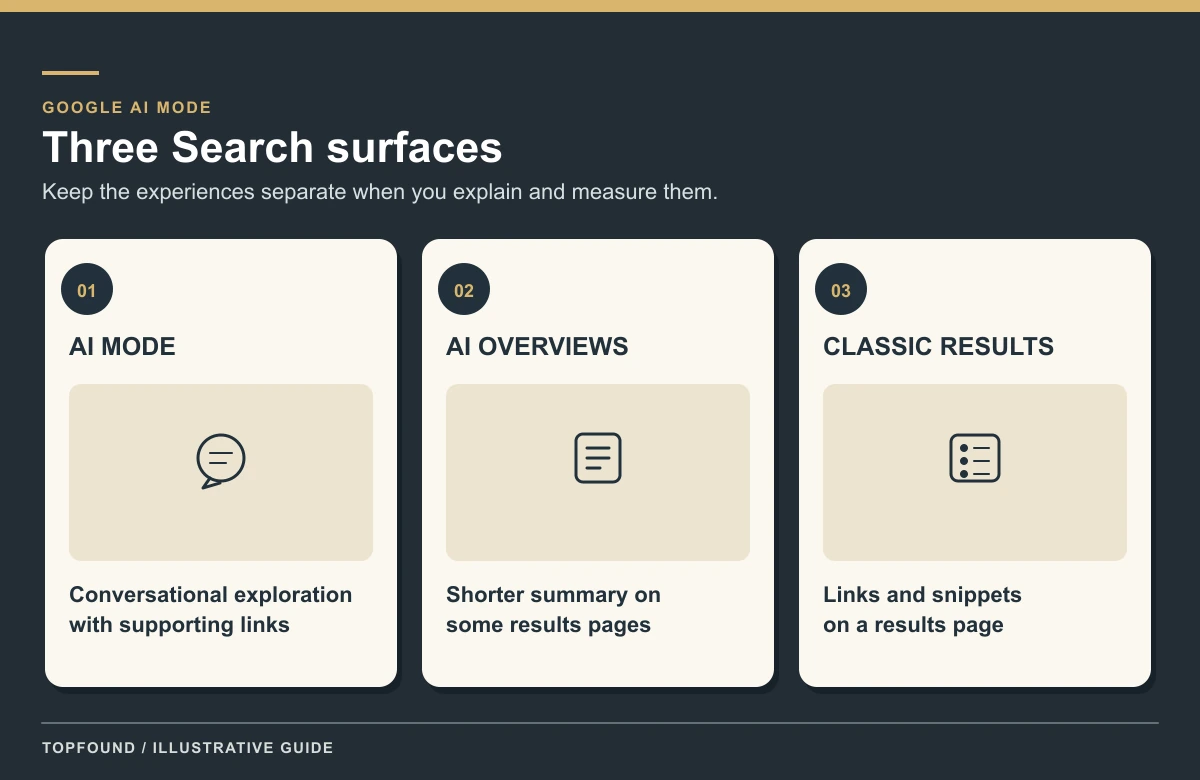
Google AI Mode vs AI Overviews: side-by-side comparison
| Google AI Mode | AI Overviews | |
|---|---|---|
| Where it appears | A separate mode of Search (google.com/ai, the AI Mode option, the Google app) | At the top of some classic results pages |
| When it shows | When the user chooses AI Mode | Only when Google judges an overview helpful; often does not trigger |
| Best for | Exploration, reasoning, and complex comparisons | Getting the gist of a topic, then jumping into links |
| Follow-ups | Yes, conversational threads and history | No thread; the user can continue into AI Mode |
| Inputs | Text, voice, images, files, pasted URLs | The query typed into classic Search |
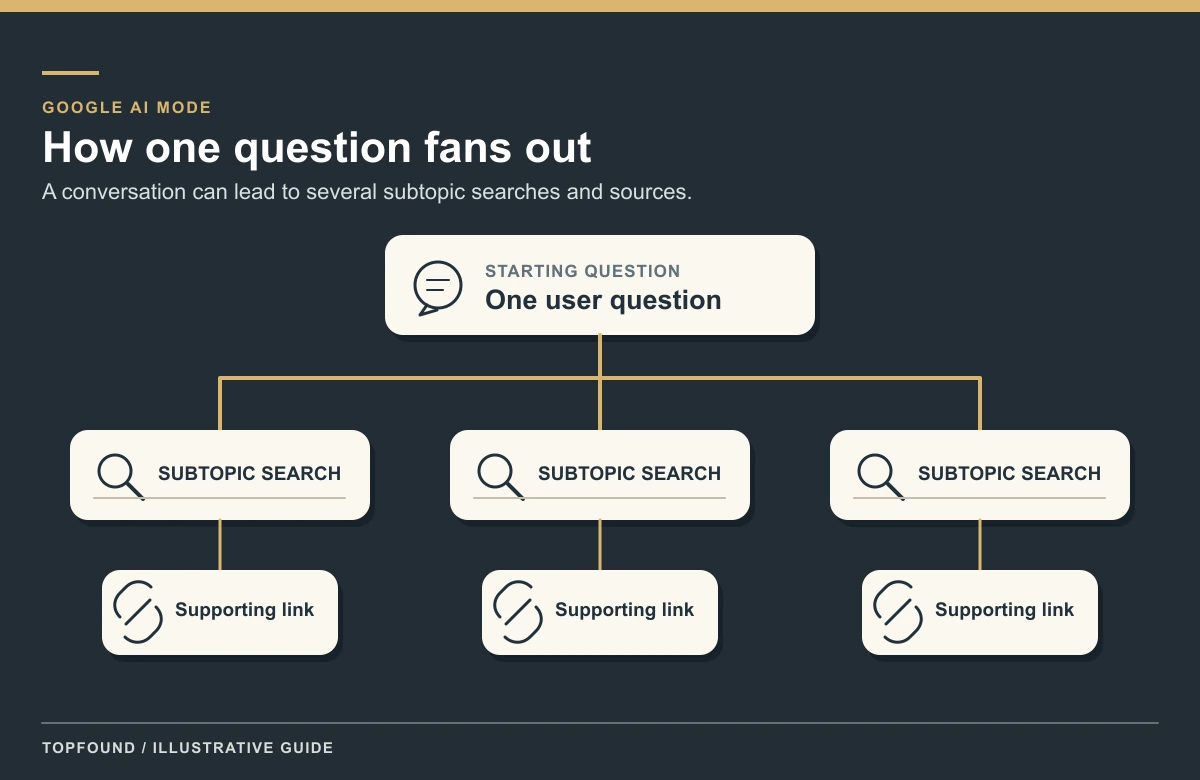
| Technique | May use query fan-out across subtopics | May use query fan-out across subtopics |
| Models | Google says it may use different models and techniques than AI Overviews | Different models and techniques than AI Mode, so links can differ |
| Page eligibility | Indexed and snippet-eligible; no special markup | Same requirement |
| Search Console | Counted in overall Web search traffic | Counted in overall Web search traffic |
Surface → what the person sees → what you record
| Surface | What the person sees | What you record |
|---|---|---|
| Google AI Mode | A conversational response with supporting links | Whether your URL was a supporting link, and whether the description was accurate |
| AI Overview | A shorter summary on some classic results, when Google shows one | Presence or absence on that query; do not copy the AI Mode row |
| Classic results | Blue links, with impressions and clicks in Search Console | Queries, pages, clicks, and average position on their own rows |
| Gemini app | A Gemini conversation, which may ground on the web | A separate prompt check; not a Search Console position |
Sources: AI features and your website, Google: Expanding AI Overviews and introducing AI Mode (Mar 5, 2025), Google Search Help: Get AI-powered responses with AI Mode in Google Search, Google Search Console Help: Performance report.
How a page becomes eligible for Google AI Mode
Google’s technical requirement is the same for AI Overviews and Google AI Mode. To be eligible as a supporting link, a page must be indexed and eligible to be shown in Google Search with a snippet. There are no additional technical requirements. You do not need a new machine-readable AI file, an AI text file, or a special schema.org type.
Meeting that bar does not mean Google will crawl, index, or serve the page. Google says indexing and serving are not guaranteed. The same sentence covers AI features: best practices and policy compliance do not force a supporting link in Google AI Mode.
The practical baseline is the one Google already publishes for Search. Allow crawling in robots.txt and at the host. Put important words in text, not only in images. Link to the page from the rest of the site. Match structured data to the visible facts. Keep preview controls (nosnippet, max-snippet, noindex) intentional, because those controls limit what Search can show, including in AI features. Google-Extended is a control for some other Google systems, not the switch for Search. The checklist version of this eligibility is /resources/google-ai-overviews-eligibility. This section only places that checklist under the Google AI Mode question.
Sources: AI features and your website, Optimizing for generative AI features, Helpful, reliable, people-first content.
What SaaS pages are worth publishing for Google AI Mode questions
Google AI Mode is where comparison and “help me decide” questions are a natural fit. The pages that can support those answers are the same pages a careful buyer would want on your site: a category explanation, a comparison against named alternatives, a pricing page whose numbers match the public product, an integrations page, and a short FAQ that answers one objection in plain text.
Write the answer in the first screen of text. Name the product, who it is for, and what it does not do. If two pages disagree on price or category, a synthesized answer has no stable fact to repeat. Entity consistency is the fix; the practice write-up is /blog/entity-seo-for-saas. Same-name collisions need disambiguation before you worry about which mode cited you.
Do not add a block of “Google AI Mode” synonyms to a page that does not answer a real question. Google’s helpful-content standard still applies. The fan-out can retrieve a page that was written for a person. It does not reward a page written only to be retrieved.
Sources: Helpful, reliable, people-first content, Optimizing for generative AI features.
How to measure Google AI Mode without inventing a rank
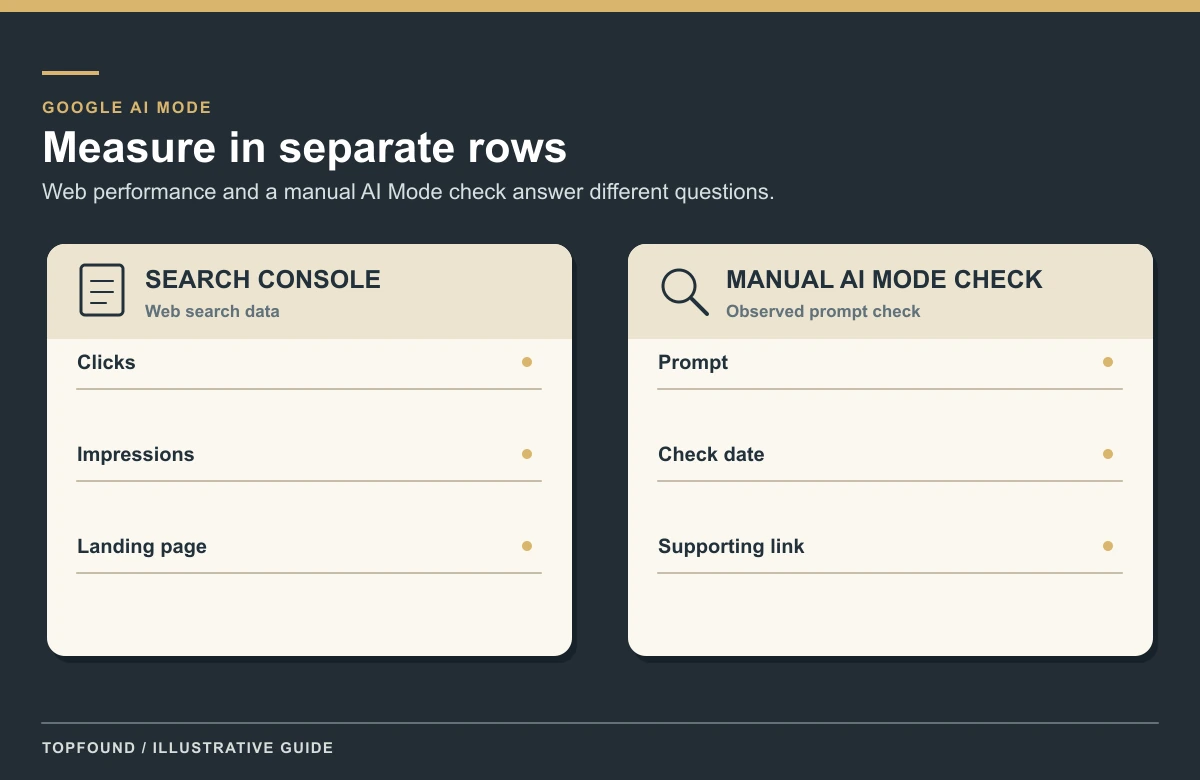
Search Console counts sites that appear in AI features, including Google AI Mode, inside overall Web search traffic in the Performance report. That means a click from an AI Mode response is not a separate channel you can filter out as “AI Mode clicks” in the ordinary Web report. If your property has the Generative AI performance report, use it for impressions of links shown in AI Overviews and AI Mode. It is still not a question-by-question citation log.
A manual check is the other row. Pick a frozen list of buyer questions, run them in Google AI Mode on a date you record, and note whether a supporting link is yours, a competitor’s, or absent. Note accuracy separately. Do not average that panel into a “Google AI Mode rank,” and do not paste the AI Overviews result into the same cell. The method for a wider panel is /resources/how-to-measure-ai-search-visibility. Share-of-voice math, if you need a ratio, stays on /blog/ai-share-of-voice.
Analytics will not show a clean Google AI Mode referrer distinct from organic Google in the way ChatGPT referrals can show utm_source=chatgpt.com. Do not relabel organic sessions as AI Mode traffic because a feature exists.
A Google AI Mode check you can repeat
- Confirm the page is indexed and snippet-eligible before you judge the content.
- Write 15 to 40 non-branded buyer questions. Keep branded questions in a separate slice.
- Record date, query, whether Google AI Mode appeared, supporting URLs, and whether the description was accurate.
- Record the AI Overview row separately when you check the same query on classic results.
- Turn a miss into a page or fact fix. Do not turn one screenshot into a percentage of Google.
Sources: Google Search Console Help: Performance report, AI features and your website.
Where managed help starts
This page explains Google AI Mode. It is not a service page. If you want a team to ship the comparison pages, fix contradictory facts, and re-check a prompt panel, the commercial offer is /services/llm-visibility-optimization. AI search implementation across engines stays broader than this one surface.
TopFound’s public list prices, if you are pricing the agency rather than the idea, are on /pricing: Growth $797/month, Scale $1,297/month, and Custom scoped. This article does not invent competitor retainers.
A results guarantee is a contract term on qualified plans, not a description of Google AI Mode. Google’s own documentation says appearance is not guaranteed. Do not read this guide as a promise that AI Mode will link to you.
FAQ
What is Google AI Mode?
Google AI Mode is Google Search’s conversational experience for questions that need exploration, reasoning, or complex comparisons. It returns an AI-written response with links to supporting websites. It is not a classic rank and not a guaranteed placement.
Is Google AI Mode the same as AI Overviews?
No. AI Overviews are shorter summaries on some classic results pages, and Google says they often do not trigger. Google AI Mode is the longer conversational experience. The two can use different models and show different links. The Overview workflow is /blog/how-to-show-up-in-ai-overviews.
Is Google AI Mode the same as Gemini?
No. Gemini is Google’s family of AI models and the name of its assistant app. AI Mode is a Search feature that runs on a custom Gemini model—Google’s March 2025 launch post said a custom version of Gemini 2.0—combined with Google’s search systems and supporting web links. Using the Gemini app is not the same as using AI Mode. The SaaS playbook for Gemini and AI Overviews is /blog/gemini-ai-overviews-saas-playbook.
What is the difference between AI Mode and AI Overviews?
AI Overviews appear automatically at the top of some classic results and give a short summary. AI Mode is a separate mode the user opens for longer, conversational answers with follow-ups. Both link to web pages, both may use query fan-out, and they may use different models, so their links can differ.
How do I use AI Mode in Google?
Go to google.com/ai, or search on google.com and select AI Mode, or tap AI Mode in the Google app. Ask in the Ask anything bar with text, voice, images, files, or a URL, then ask follow-ups. Availability varies by account, country, and language.
Is there a Google AI Mode tool or app to download?
No separate tool is needed. AI Mode is built into Google Search on the web and in the Google app; Google also offers a Google app for desktop on Windows with AI Mode access.
How do we show up in Google AI Mode?
Be indexed and eligible for a Search snippet, and publish helpful pages that answer the question in text. Google says there is no extra AI file or special schema. Eligibility does not guarantee a supporting link.
Does schema or llms.txt get a page into Google AI Mode?
No. Google says you do not need special schema.org markup or a new AI text file for AI Overviews or Google AI Mode. Structured data should match the visible page when you use it for other Search features.
How do we measure Google AI Mode?
Use Search Console’s Web performance data, plus the Generative AI report when your property has it. Keep a dated prompt panel for supporting links and accuracy. Do not invent a separate AI Mode rank or relabel all organic Google traffic as AI Mode.
Can an agency guarantee Google AI Mode inclusion?
No. Google states that meeting requirements does not guarantee crawling, indexing, serving, or an AI feature appearance.
Where does TopFound fit?
TopFound (topfound.io) is a managed AEO / AI SEO agency. This page is the explainer for Google AI Mode. A soft next step is /aeo-report. Public plans are on /pricing (Growth $797/month, Scale $1,297/month, Custom scoped).
Keep Google AI Mode on its own checklist
If you want the definition, stay on this page. If you want the AI Overviews workflow or the Gemini SaaS playbook, use those URLs. If you want TopFound (topfound.io) to run the broader visibility work, start with the service page or a free AEO report.
Conclusion
Google AI Mode is the priority head for this page because the query is a real Search feature with real demand: Ahrefs Lite, United States, 2026-10-04, shows SV 29,000, KD 0, CPC $0.90, informational intent. KD 0 is a tool score, not a promise that a new URL will outrank established explainers. The job of this URL is to say what the feature is, to keep it separate from AI Overviews and from the Gemini playbook, and to state the eligibility limit in Google’s own terms.
Use /blog/how-to-show-up-in-ai-overviews for the Overview workflow, /blog/gemini-ai-overviews-saas-playbook for the SaaS Gemini and Overviews playbook, and /resources/google-ai-overviews-eligibility for the checklist. When you want managed work from the agency at topfound.io, use /services/llm-visibility-optimization or /aeo-report—not a same-name studio elsewhere.
Sources: AI features and your website, Helpful, reliable, people-first content.